


From a vendor's website, cloud access control platforms are hard to tell apart. They all have mobile credentials, remote management, and one dashboard for every door.
What separates them is the stuff you find out later. Whether your existing readers survive the swap. Whether someone has to open an app to badge in. And if you stop paying, what you're actually left holding.
Most buyers ask that last one for the first time when a renewal quote arrives, which is about three years too late. It's worth asking every vendor here, us included.
So, this article compares the nine best cloud-based access control systems on those questions.
Best cloud-based access control systems at a glance
Which system fits depends on what you are consolidating, how much existing door hardware you want to preserve, and whether access needs to share an operating environment with video, visitor workflows, or emergency response.
The 9 best cloud-based access control systems
This ranking is based on cloud-specific fit, deployment flexibility, credentials, platform depth, retrofit options, and pricing structure.
All nine support cloud-managed access control. They diverge on hardware, credentials, video, integrations, and administration.
Coram
Best for: Teams that want access control operating in the same environment as Video Security, Emergency Management, and Guest Management.
A door event on Coram carries its camera clip. That matters most to teams who currently answer "who opened this door and what happened next" by opening two applications and matching timestamps. Access Control, Video Security, Emergency Management, and Guest Management run in one environment, and since June 2026 permissions, schedules, and overrides are editable from the mobile app.
Where it's strong
- Access events and video are one record, not two you correlate by timestamp.
- Syncs users from Active Directory, Entra ID, and student information systems, so there is no second directory to maintain.
Tradeoffs
- Controllers top out at four doors, with no eight or sixteen-door panel. Larger single-site deployments therefore need more controllers, and more labor to install them.
- Mobile access is in-app unlock only. Coram does not support NFC tap, mobile wallet credentials, BLE proximity, or face as a door credential. Face recognition exists on the video side, where a false match does not open a door.
- Coram replaces Mercury, HID, and S2 panels rather than integrating with them. A requirement to keep those panels permanently is a poor fit.
Deployment and retrofit: As in the table above. Existing unencrypted cards carry over; encrypted third-party card stock does not, so confirm your card format before assuming credentials survive.
Pricing model: Per managed door, per year, on 1, 3, 5, and 10-year terms, quoted. More on Coram Access Control.
Brivo
Best for: Commercial real estate and property portfolios that want a mature cloud platform with wide integration coverage.
Brivo has been building cloud access control longer than most of this list, and the administration tooling shows it. Following its 2025 merger with Eagle Eye Networks, it also sells its own cameras rather than relying on partners, which changes the calculus for anyone who assumed unified video meant a second vendor relationship. We put the two platforms side by side in our Brivo vs Openpath vs Coram comparison.
Where it's strong
- The widest credential range here: cards, fobs, mobile, Apple and Google Wallet, PIN, biometrics, and license plate.
- Own cameras plus integration with over 8,000 third-party models.
- Its access platform works with a wide range of existing cameras, controllers, locks, and readers.
Tradeoffs
- Capability is split across four editions plus four add-on packs covering intrusion, access, video, and reporting. Confirm which edition includes what you assumed was standard.
- That same breadth makes purchasing more complex than a narrower access-only product.
Deployment and retrofit: Brivo positions itself as building on existing systems rather than replacing them.
Pricing model: Monthly or annual subscription, quoted through resellers.
Kisi
Best for: IT-led offices and distributed workplaces that care about APIs, identity integrations, and migrating in stages.
The migration path is the notable part. A site can deploy Kisi fully, or keep most of an existing access setup and swap only the controller, using a Wiegand board to bring legacy readers along.
For an IT team that inherited someone else's install and cannot rip it out this quarter, that is often the deciding feature. Kisi and Avigilon Alta take noticeably different approaches here, which we walk through in Openpath vs Kisi vs Coram.
Where it's strong
- Mobile is well built out: app unlock, Apple Wallet, and smartwatch entry on both platforms.
- Open integrations and identity features suit IT-owned deployments.
- Kisi documents the migration path explicitly, including what carries over.
Tradeoffs
- Kisi builds no camera of its own. It resells VORTEX hardware and integrates with Lumana, Cisco Meraki, Spot AI, Eagle Eye Networks, and Rhombus Systems, so unified video means a second vendor relationship.
- Advanced functionality is assembled from platform licensing, integrations, and optional hardware. Confirm what your quote includes.
Deployment and retrofit: The common migration replaces the controller with a Controller Pro 2 and keeps compatible readers, locks, wiring, and credentials.
Pricing model: Kisi publishes a monthly starting price and hardware list pricing, one of the few platforms here you can budget against before talking to sales. Enterprise deployments are customized.
Avigilon Alta
Best for: Organizations that want mobile-first access control and expect to use other Motorola Solutions security products.
Formerly Openpath, Avigilon Alta has the strongest hands-free mobile experience on this list. Wave to Unlock opens a door with a hand gesture, with no app to open and no phone to unlock. Apple Wallet credentials work without unlocking the iPhone at all. If you are weighing it against a unified platform, our Coram AI vs. Avigilon breakdown covers where each one fits.
Where it's strong
- Hands-free entry that genuinely works, which matters more in high-traffic lobbies than most feature comparisons suggest.
- The Video Reader Pro combines a reader and a high-resolution camera in one device, associating footage with access events at the door itself.
- Hardware spans a single-door PoE controller up to sixteen-door hubs.
Tradeoffs
- Some capabilities depend on subscription tier, so compare plans rather than the product.
- Pricing is the least transparent on this list. Avigilon publishes no pricing model, and neither do the major review sites, so budgeting requires a quote before you can compare anything.
Deployment and retrofit: Avigilon documents backward compatibility with legacy access and video environments, though the clearest statement of it sits on an undated page. Verify against your specific hardware.
Pricing model: Quote-based. Avigilon names three tiers on its cloud page and routes buyers to a quote form without stating what the price scales on.
Verkada
Best for: Organizations that prefer a tightly integrated single-vendor cloud security ecosystem.
Verkada connects access with video, intercom, alarms, and workplace products through one console. Committing to the ecosystem does not mean replacing every reader on day one: Verkada supports Wiegand, the protocol behind most deployed HID and similar readers, and OSDP through both its own and third-party readers.
Existing proximity cards can usually stay in service. For schools weighing a closed ecosystem against an open one, we cover the tradeoff in Verkada Access Control vs. Open Integrations.
Where it's strong
- Native integration between access events and Verkada video.
- Controllers scale from a single door up to a sixteen-door unit, a genuine advantage at dense single-site deployments where Coram needs more panels.
- Face unlock runs on exactly one device, the Access Station Pro. Recognition happens on-device, with a depth sensor for spoof resistance.
Tradeoffs
- The value case depends on running several Verkada products, which increases single-vendor dependence.
- Hardware and software are licensed together within the ecosystem, so model renewal and expansion before standardizing widely.
Deployment and retrofit: Existing readers and proximity cards can often be retained.
Pricing model: Verkada publishes hardware list pricing, and device software licenses run in 1, 3, 5, or 10-year terms. It is the most price-transparent platform on this list.
PDK
Best for: Integrator-installed small and mid-size properties that want straightforward mobile-first cloud access.
A local Cloud Node is the center of a PDK site. It connects to the cloud, talks to the local door controllers, and stores system data on-site so event history survives an internet outage. Administration runs through the browser and the PDK Access app.
Where it's strong
- Mobile-first administration and credentials are core rather than added on.
- Local data storage at the Cloud Node preserves event history through connectivity loss.
- A large distributor and integrator network suits dealer-led installations.
Tradeoffs
- Offline operation is time-limited and partial. PDK's own documentation notes that access continues for a configured period before falling back to a restricted mode, and that mobile credentials, elevator rules, anti-passback, and real-time reporting stop while disconnected.
- No camera product. Video comes through integrations with OpenEye, Camect, Digital Watchdog, Hanwha, and others.
- Purchasing is partner-driven, which suits integrator-led buyers and frustrates IT teams that want self-service procurement.
Deployment and retrofit: Deployments are designed around Cloud Nodes and PDK controllers.
Pricing model: Hardware is quoted through distributors. PDK does not publish a software pricing model, so confirm the recurring cost structure directly rather than assuming a subscription.
Genea
Best for: Commercial property and office portfolios already on Mercury hardware, or teams avoiding proprietary panels.
Genea is software-first. The panel is somebody else's. Rather than requiring its own hardware ecosystem, it runs on non-proprietary Mercury and compatible HID equipment, which makes it unusually interesting to organizations with an existing Mercury footprint that want cloud administration without touching field hardware.
Whether that openness is worth the tradeoffs is the subject of our guide to proprietary versus non-proprietary access control, and we compare the platforms directly in Genea vs Openpath vs Coram.
Where it's strong
- Genea states that with a non-proprietary, Mercury-based system it can leverage most of the existing hardware.
- Mobile credentials include Bluetooth keys plus Apple Wallet and Google Wallet.
- Video integrations span Milestone, Cisco Meraki, Eagle Eye, Rhombus, and others.
Tradeoffs
- No camera platform of its own, so unified video always means a second vendor.
- Video integration depth varies by VMS. With Meraki, footage opens inside Genea. With Milestone, it runs the other way and access events surface inside the Milestone client. Confirm the direction for your VMS.
- Without compatible Mercury infrastructure, the retrofit advantage largely disappears.
Deployment and retrofit: Best fit is an existing non-proprietary Mercury deployment.
Pricing model: Genea publishes no pricing. Its own cost article notes that most access control companies avoid publishing prices and directs readers to contact a representative.
ButterflyMX
Best for: Multifamily, mixed-use, student housing, and properties where resident, visitor, delivery, and building access are one workflow.
ButterflyMX started from intercom and property access, and that still defines where it wins. Resident and visitor workflows are the product here, not a module bolted onto an enterprise access system. The platform now spans access controllers, readers, cameras, video intercoms, vehicle access, elevator controls, and package rooms.
Where it's strong
- Smartphone, fob, keycard, and PIN all work across the platform.
- ButterflyMX now sells its own dome and bullet cameras that connect to its access control and intercom products.
Tradeoffs
- Much more property-centric than a general-purpose enterprise platform.
- Teams securing corporate offices, manufacturing sites, or K-12 campuses will find resident access, deliveries, and property-management integrations largely irrelevant.
Deployment and retrofit: ButterflyMX says its access system installs over most existing access control systems and works with doors, gates, and garages on electronic or magnetic locks.
Pricing model: $20 per month per door, gate, or elevator, with hardware purchased separately.
Ubiquiti UniFi Access
Best for: IT teams that already run UniFi networking, want no recurring software fee, and are comfortable owning the troubleshooting.
Ubiquiti is the outlier on this list, and it belongs here for a specific reason: it is the only platform with no recurring software cost at all. You buy hubs and readers, and that is the bill. For an IT department that already manages UniFi switches and access points, adding doors to the same console is a small step.
The same tradeoffs that push teams off UniFi on the camera side tend to apply at the door, and we work through them in Ubiquiti alternatives.
Where it's strong
- Full hardware pricing published on the public store, with no software subscription layered on top.
- Access sits in the same console as UniFi networking and cameras, which is genuine unification for a shop already standardized there.
- A retrofit hub supports existing wiring and readers.
Tradeoffs
- It is built for the IT admin who assembles their own stack and can troubleshoot networking. There is no equivalent to enterprise support, SSO at the depth larger organizations expect, or a compliance posture built for audited environments.
- No emergency management or visitor workflow to integrate with, so unification stops at network and video.
- If your team wants a managed platform and a support number, this is the wrong fit, and that is a question of fit rather than quality.
Deployment and retrofit: Retrofit hub and standard reader protocols cover most existing installations.
Pricing model: One-time hardware purchase, no published recurring software fee.
What "cloud-based" means for access control
A cloud-based access control system hosts the management software and administrative data in the cloud while the controller in your building still makes the actual door decision locally.
That split is the whole idea. Readers sit at the door, a local controller drives the locks and holds cached credentials and schedules, and cloud software is where administrators configure everything. Changes you make in the cloud push down to the controller. Events from the door come back up. If any of those pieces are unfamiliar, our guide to access control system components explains what each one does and why the controller matters more than the software for anything that happens at the door.
You get centralized administration without turning every door into an internet-dependent endpoint. That model has a name the industry uses, access control as a service, and it is worth understanding before you evaluate anything, because how a vendor implements it determines what still works when the connection drops.
How to evaluate a cloud access control system
You have settled the architecture question. What decides the purchase now is how these nine products differ from each other, because that is what your team administers every day. The five criteria below are specific to cloud platforms. For the checklist that applies to any system, start with our access control systems buyer's guide.
1. Deployment model. Ask whether the product is fully cloud-hosted, cloud-managed with local controllers, or hybrid, then ask what still runs locally. "Cloud" describes where administration happens, not how the doors behave.
Ask: Where is the access decision made, and what has to be installed at each site?
2. Credentials. Most platforms cover some mix of cards, fobs, apps, wallets, and PINs. The real split is how mobile works. Some require opening an app. Others support wallet or NFC tap, or open the door as you approach.
Be concrete about this one. Brivo, Verkada, Avigilon Alta, and Genea all support wallet credentials. Coram and PDK do not; their mobile access runs through their own app. If tap-to-enter matters to your users, it narrows the field immediately, and the tradeoffs between PIN, card, and mobile credentials are worth understanding before you let a demo decide it for you.
Ask: Which credential types work without opening an app, and are any separately licensed?
3. Unification depth. "Unified" is doing a lot of work in this category. At one end it means a video thumbnail next to a door event. At the other it means four products on one tenant, one user list, one incident workflow.
Coram, Verkada, Brivo, and ButterflyMX each extend beyond access. Kisi, PDK, and Genea depend on third-party integrations for video. Ubiquiti unifies with networking rather than with security operations.
Ask: How many products share the same users, permissions, event history, and administrative environment?
4. What you keep if you leave. This is the question worth asking every vendor here, including us. Cloud access control puts your credential database, your audit history, and often your hardware entitlement on someone else's platform. Buyers who skip this question tend to discover the answer at renewal, when the leverage has moved.
Ask: If we stop paying, what keeps operating locally, what can we export, and what would we have to replace?
5. Multi-site administration. One dashboard does not mean simple multi-site administration. Check whether locations share a user directory and policy model, how global changes propagate, and whether each building needs its own tenant.
Ask: Walk us through adding our fourth site. What gets recreated, and what carries over?
How cloud access control pricing differs by vendor
These nine do not price the same way, and the differences matter more than the numbers when you are comparing quotes.
Four of the nine publish pricing.
- Verkada publishes hardware list prices and sells device software licenses in one, three, five, and ten-year terms.
- Kisi starts at $99 a month for its platform, with hardware listed separately.
- ButterflyMX charges $20 per month for each door, gate, or elevator its hardware controls.
- Ubiquiti publishes its entire hardware store with no licensing fee attached at all.
The other five quote:
- Brivo sells monthly or annual subscriptions through resellers across four editions plus add-on packs.
- PDK routes hardware through a distributor network and publishes no software pricing.
- Genea publishes nothing, and says as much in its own cost article.
- Avigilon publishes the least of anyone here, naming three tiers without stating what they scale on.
- Coram quotes as well, per managed door per year.
The underlying structures differ too:
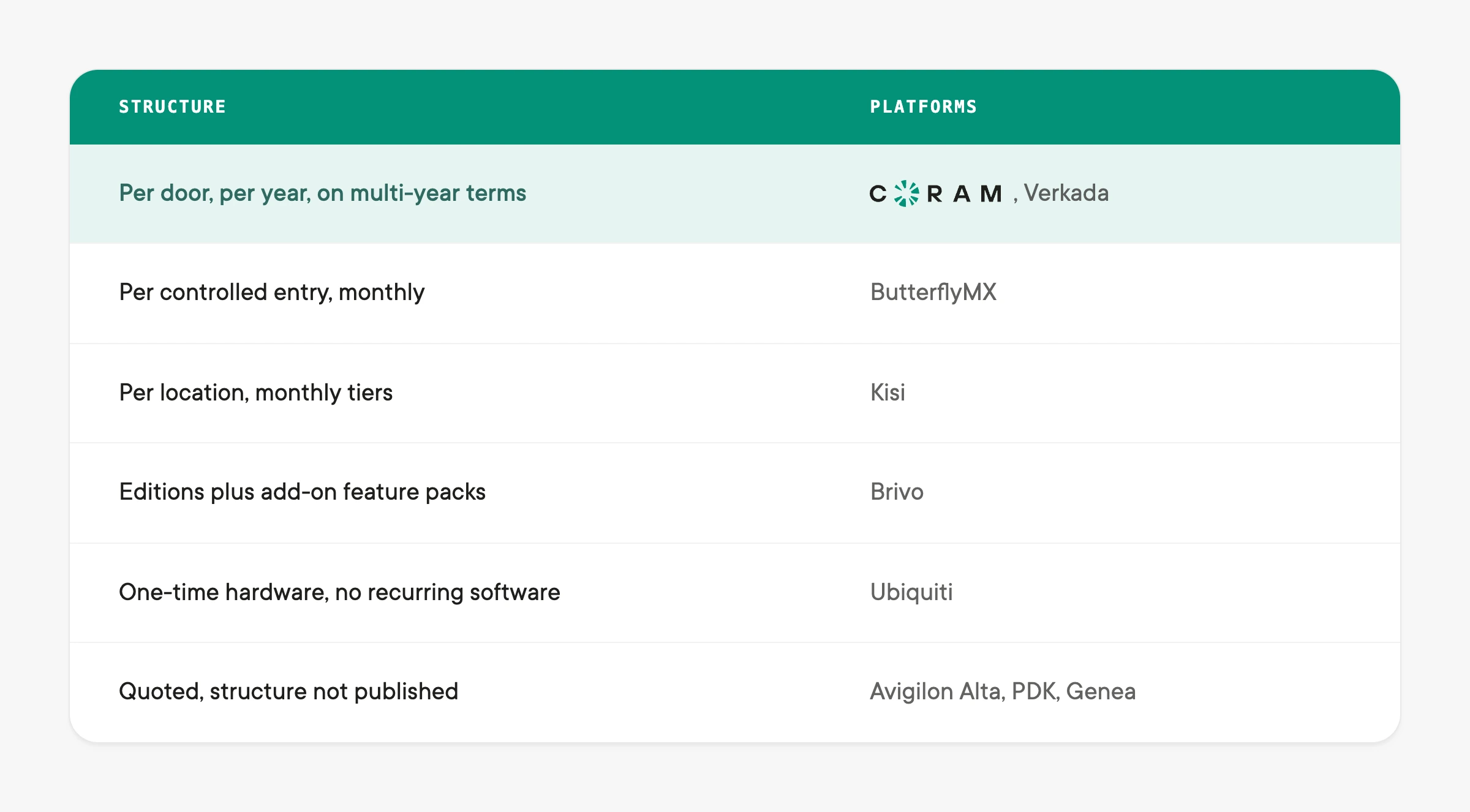
The unit determines how your cost moves as you grow.
Per-door pricing is predictable. It scales with doors and nothing else.
Per-location tiers are the one to watch, because crossing a threshold can move the number in a single step, and edition-based pricing has its own version of that problem: buying a whole tier to get one capability.
Four questions worth asking every vendor on your shortlist:
- What is the licensing unit, and what triggers a price increase? Adding a door, adding a site, and crossing a user count are three different events with three different costs.
- Are mobile credentials licensed separately? On some platforms they are included, on others they are a per-user line.
- Which capabilities sit behind an edition or an add-on pack? Brivo splits intrusion, video, access, and reporting into separate packs. Confirm which tier includes what you assumed was standard.
- What happens at renewal, and if you stop paying? Ask what keeps operating locally, what you can export, and how the price escalates on renewal.
None of this tells you what a project actually costs, because the software line is rarely the biggest number on the invoice. Readers, locks, wiring, and the labor to install them usually are, and those scale with your building rather than with your vendor choice.
Our breakdown of access control system costs works through the hardware and installation side. If you have not settled cloud against on-premise yet, the five-year ownership math sits in our cloud versus on-premise comparison, and it will change your budget more than any vendor on this page will.
Not sure cloud is the right architecture?
Cloud is strongest when you need remote administration across locations, automatic updates, and less on-site server infrastructure. Organizations with air-gapped facilities, a written local-storage mandate, or a recent panel investment that still works may reasonably keep some or all management on-premise.
"Hybrid" comes up here, and it usually means one of two things: a cloud management layer running on top of access panels you already own, or some of your sites on cloud while others stay local. The first is a genuine architecture. The second is a transitional state, and it works best with a target and an end date rather than as a permanent plan.
The question is not which architecture wins. It is which one matches your operational, IT, connectivity, and ownership requirements. See the full cloud versus on-premise access control comparison.
Selecting the best cloud access control system: where to start
Here is the uncomfortable part about a list like this one.
Every gap in the table above is temporary. The platforms without wallet credentials will ship them. The ones without native video will buy a camera company, the way Brivo just did. Five years from now this comparison will be much harder to write, because the feature columns will have filled in and the products will look nearly identical on paper.
What will not converge is the part no comparison table has a column for. Whether a person answers when your system breaks. Whether the company still supports the hardware they sold you in 2026. Whether the roadmap moves toward your building or away from it.
That is not an abstraction. 4C Foods, a food manufacturer, ran biometric access control until it quietly stopped being supported. The failure was not dramatic. It was administrative: turnover at the vendor, support that thinned out, and eventually a system that could no longer enroll a new employee.
When they replaced it, they evaluated Coram against Verkada. The deciding factor was not on either feature list. It was whether they would get a relationship or get lost in the shuffle. They moved to card access with mobile management, and the summary a month in was that it just works.
The lesson is not that biometrics are bad. It is that the fanciest credential on the market is worthless if nobody is maintaining the platform underneath it, and you cannot see that in a spec sheet. You can only see it in how a vendor behaves, which is why the most useful thing you can do is give one a reason to behave.
So put a system on a door. Real hardware in your own building tells you in a few weeks what a comparison table cannot tell you at all: whether your existing readers carry over, whether the administration model fits the way your team actually works, and what happens the first time something does not go to plan. That last one is the real test, and it is a test of the company more than the product.
Start it sooner than feels necessary. If your current platform has an end-of-support date, that is your real deadline rather than your budget cycle, and in K-12 and public sector, grant windows and fiscal-year close both move faster than procurement expects.
See how Coram Access Control works, or read the 4C Foods story in full.





.png)

