Fisheye Security Cameras: 5MP vs 12MP & Dewarping
Where fisheye security cameras work and where they don't, how to choose 5MP vs 12MP, and why dewarping belongs in your software, not the camera.

Stu Waters
Published


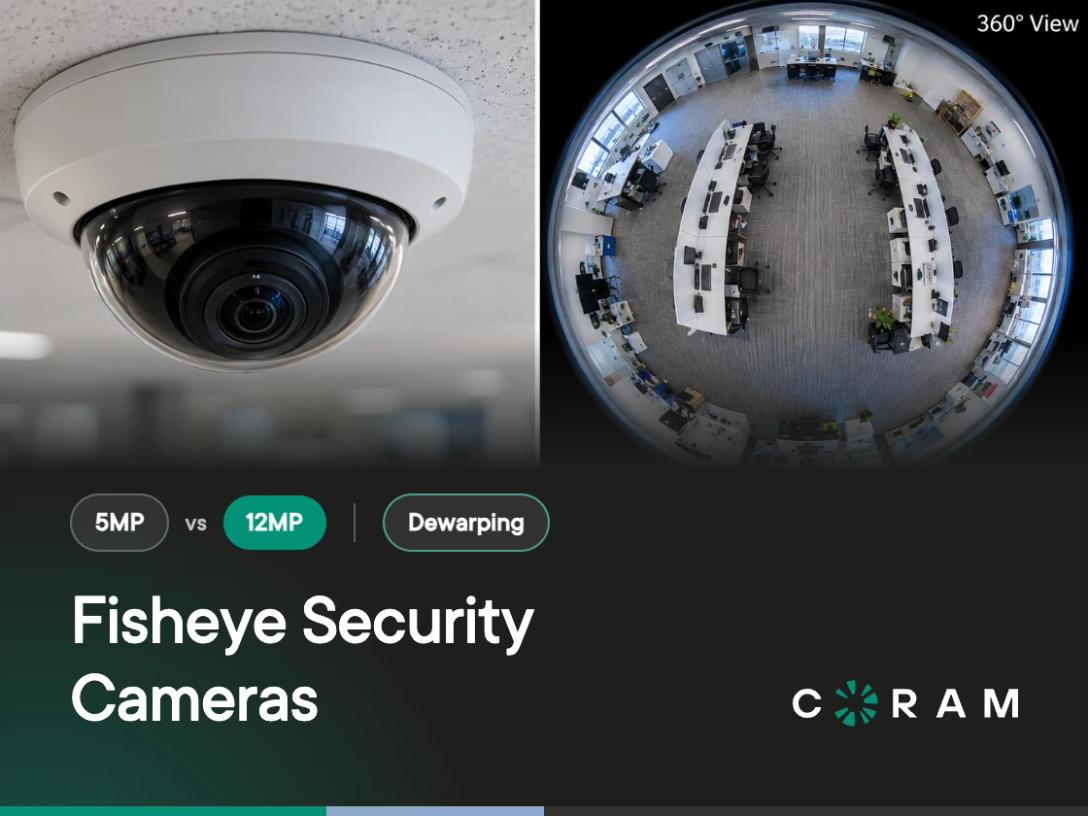
A fisheye security camera uses a single ultra-wide fisheye lens to cover 180 or 360 degrees from one mounting point, so one camera can watch an entire room. The trade-off is detail. A fisheye shows you what happened across a cafeteria or a warehouse floor, but it is a poor tool for identifying a face on the far side of that room.
The raw image is also a distorted circle, so a fisheye is only as useful as the software that dewarps it. Resolution, mounting and dewarping decide how much detail you keep, and that is what the rest of this guide works through.
Where fisheye cameras work, and where they don't
Fisheyes work best in open rooms you can see from the middle of the ceiling, where the question is "what happened in here?" rather than "who exactly was that?"
Good fits:
- School cafeterias, gyms and multipurpose rooms, where one ceiling camera can cover the whole floor during lunch or an assembly. See how this fits a wider school security camera layout.
- Church sanctuaries and lobbies, where people gather in one large space.
- Open warehouse floors and aisle intersections, where activity moves in every direction. More on warehouse security cameras.
- Retail floors, reception areas and hospital waiting rooms, where staff need an overview of the room rather than a close-up of one spot.
Poor fits:
- Entrances and doors, where you need a clear view of the face of everyone coming in.
- Cash points and service counters, where the detail that matters sits in one small area.
- Corridors, fence lines and building perimeters. These spaces are long and narrow, and a fisheye covers every direction at once, so much of its image lands on walls and empty ground instead of the length you need to see.
Many sites pair the two: a fisheye in the middle of the room for context, and a standard camera on each entrance for identification.
180° or 360°: mounting decides the view
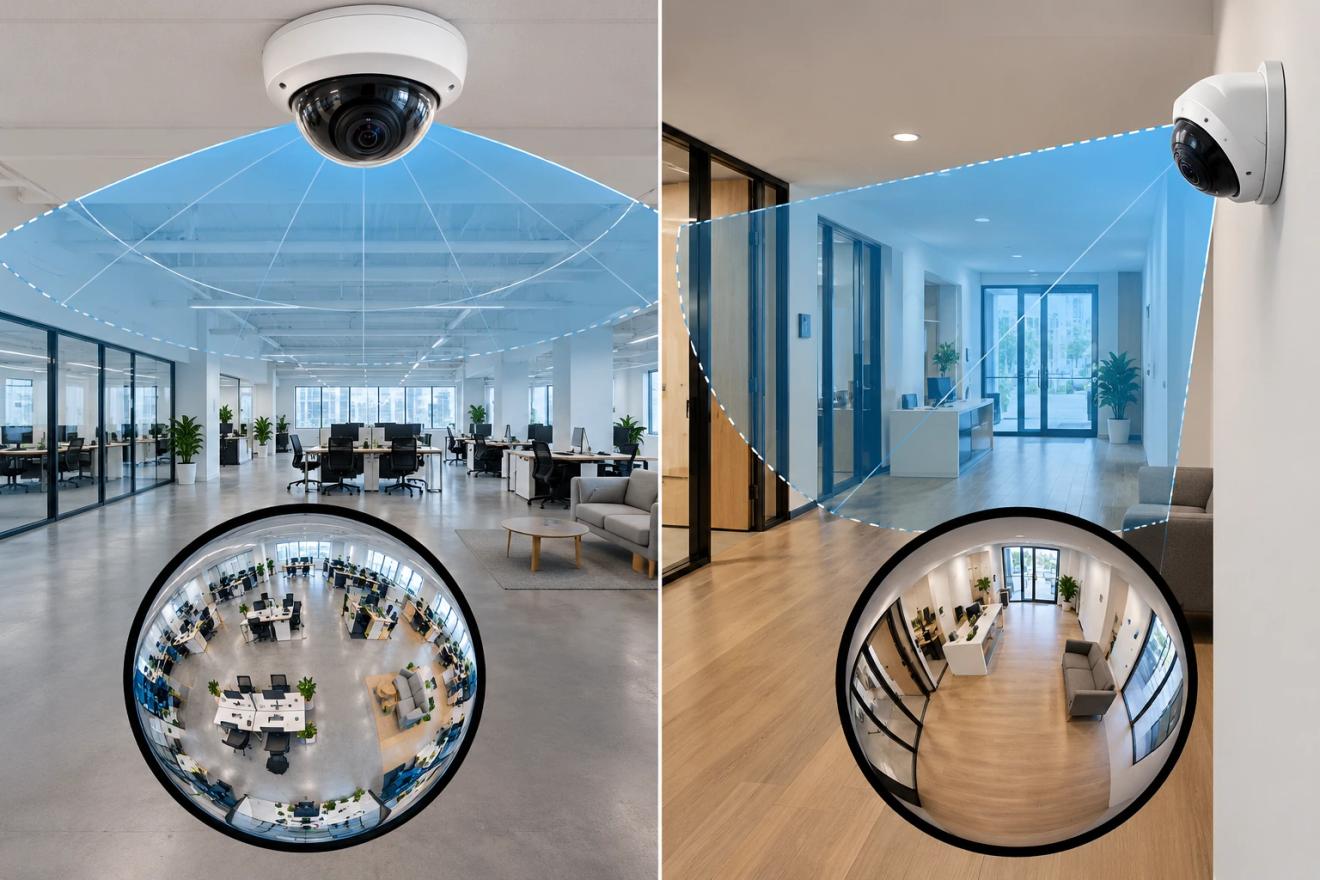
Whether you get a 360° or a 180° view depends mostly on how the camera is mounted, not on the size of the room. A ceiling-mounted fisheye looks straight down and captures a full 360° circle. A wall-mounted fisheye looks out into the room and captures roughly half of that.
So start with where you can mount. A ceiling above the middle of the space gives the most even coverage. If a wall is the only option, a 180° view from one side can still cover a classroom or a small lobby. The mounting position also has to be set in the software that dewarps the image, because it changes how the circle is flattened.
5MP vs 12MP fisheye cameras
Choose a 5MP fisheye for smaller rooms with standard ceilings and a 12MP fisheye for large open floors and high ceilings. Neither resolution turns a fisheye into an identification camera.
Resolution matters more on a fisheye than on a standard camera because of pixel spread. A 5MP dome spends its pixels on one view. A 5MP fisheye stretches the same pixels across the whole room, so each person in the image gets far fewer of them. The loss is greatest toward the edge of the circle, which is often where people enter from the doors.
In practice, 12MP earns its cost in the big rooms, where pixel spread is worst. In a small room, a 5MP fisheye already sees most of the space at close range.
Fisheye Dewarping
While fisheye cameras provide extensive coverage, their wide-angle lenses create a circular, distorted image that can be challenging to interpret. This distortion can hinder effective surveillance, as it makes it difficult to understand the scene accurately.
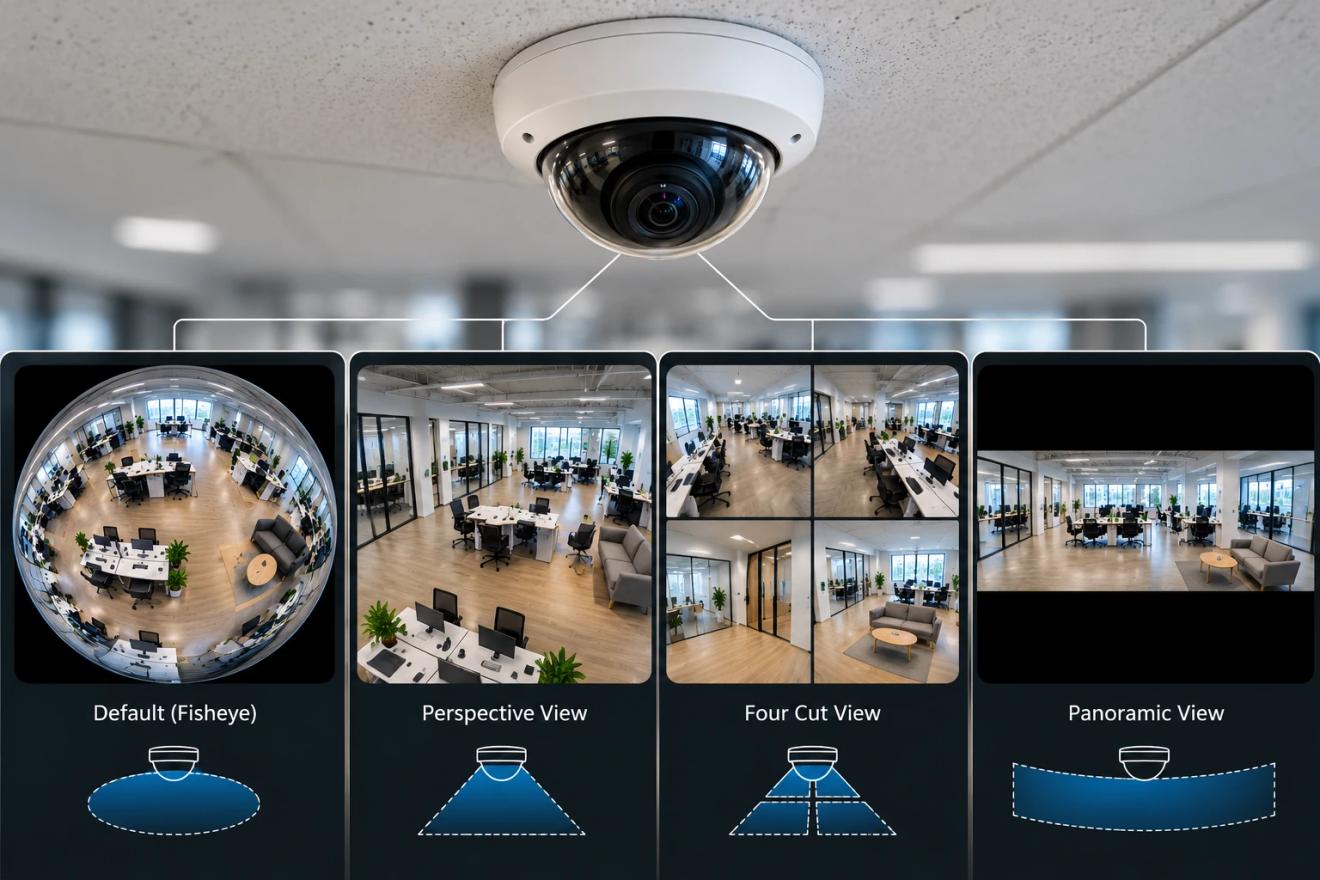
Dewarping is the process of correcting this distortion to produce usable, flat images. It transforms the circular fisheye image into multiple conventional views, such as panoramic or quad views, which are easier to interpret.
Types of Dewarped Views Include:
- Perspective View: Simulates the view of a standard camera, focusing on a specific area within the fisheye image. In this view, the users can navigate and generate different viewpoints which are not distorted.
- Panoramic View: Provides a wide, horizontal view of the environment, ideal for monitoring large areas.
- Quad View: Divides the image into four sections, each covering different angles, allowing simultaneous monitoring of multiple areas.
Dewarping enhances the usability of fisheye cameras by making it easier for users to interpret scenes, respond to incidents, and perform detailed analysis.
Choice of Video Management Software for Dewarping
The effectiveness of dewarping largely depends on the capabilities of the VMS used in conjunction with the fisheye camera. There are two primary methods for dewarping images:
Camera-Based Dewarping involves cameras that have built-in dewarping capabilities. These cameras automatically generate multiple views from the fisheye image. However, relying on camera-based dewarping has limitations:
- It ties you to specific camera models or brands, reducing flexibility.
- Built-in dewarping features may be limited in functionality, such as it may not generate all the views the user may need
- Upgrading or replacing cameras can be costly if you need enhanced dewarping features.
VMS-Based Dewarping relies on the video management software to perform dewarping, offering several advantages:
- Universal Compatibility: Works with various camera brands and models, providing greater flexibility in hardware selection.
- Enhanced Functionality: Offers multiple dewarping options and views, improving the user experience.
- Cost-Effectiveness: Eliminates the need for specialized cameras with built-in dewarping, allowing the use of existing hardware.
When selecting a VMS, it's crucial to ensure it can dewarp images from any fisheye camera, regardless of the manufacturer. This ensures that you're not limited by hardware constraints and can fully utilize your surveillance equipment.
How Coram dewarps any fisheye camera
Keeping the cameras you already own is a common requirement when teams change systems. In Coram's State of Physical Security 2026 survey of 241 security, IT, operations, and facilities leaders, 57.3% named working with the cameras they already own as a factor in choosing a security system (read the report).
Coram, an AI physical security platform, handles fisheye dewarping in software. It detects fisheye cameras automatically, regardless of manufacturer or resolution, so the cameras you already have don't need built-in dewarping.
Two settings control how each fisheye looks:
- Mounting position: choose ceiling or wall to match how the camera is installed. The right setting affects dewarping quality.
- Default view: pick whether the camera opens in its native circular view or in Perspective, Four Cut or Panoramic, the views described above. Switching views on a camera's timeline doesn't change its default.
One limit to know before an investigation: clips you download or share externally carry the original fisheye image, not the dewarped view. Plan for that when you send footage to anyone outside your organization.
Coram Video Security shows how fisheye footage sits alongside the rest of your cameras.
Fisheye vs dome, PTZ and multi-sensor cameras
Use a fisheye for whole-room awareness, and a different camera type wherever you need detail on one spot or one direction.
A practical layout mixes types, with fisheyes in the large rooms and fixed cameras on the doors. If you're choosing the fixed cameras next, start with dome vs bullet cameras.
What to check before you buy
Six checks cover most fisheye purchases:
- Resolution for the room: 5MP for smaller spaces, 12MP for large floors and high ceilings.
- Mount type: ceiling for 360°, wall for about 180°.
- Low-light performance: built-in infrared (IR) or strong low-light imaging if the space is used after dark.
- Weather rating: IP67 if the camera goes outdoors.
- Impact rating: IK10 where the camera can be hit, such as a gym or a parking area.
- Dewarping in your software: confirm your system can dewarp every fisheye brand you run, not only one vendor's.
Conclusion
A fisheye earns its place in the rooms where you need the whole picture, not in the doorways where you need a face. Get the resolution and the mount right for each room, and make sure the software running your cameras can dewarp every fisheye you own, whoever made it.
FAQ
What is a fisheye camera used for?
Fisheye cameras watch large open spaces from a single mounting point, such as cafeterias, gyms, lobbies, retail floors and warehouses. One ceiling-mounted fisheye can show activity across the whole room and cut down blind spots. It is often paired with standard cameras at the entrances, where a clear view of each face matters.
Are fisheye cameras good for security?
Yes, for situational awareness. A fisheye shows what happened across a room and how people moved through it. It is weaker at identifying faces at a distance, because its pixels are spread across a much wider view. It also depends on dewarping software to turn the circular image into views your team can actually use.
How much does a fisheye camera cost?
Price depends mainly on resolution, whether the camera is rated for outdoor use, built-in infrared and any onboard analytics. 12MP models cost more than 5MP models, and IP67 or IK10-rated housings add to the price. If your software handles dewarping, you don't need to pay for dewarping built into the camera.
Which type of CCTV camera would be used with dewarping software?
A fisheye camera. Its ultra-wide lens records a circular, distorted image, and dewarping software flattens it into standard views such as panoramic, perspective and quad. Dewarping can run in the camera itself or in the video management software, and software-side dewarping works across camera brands.