


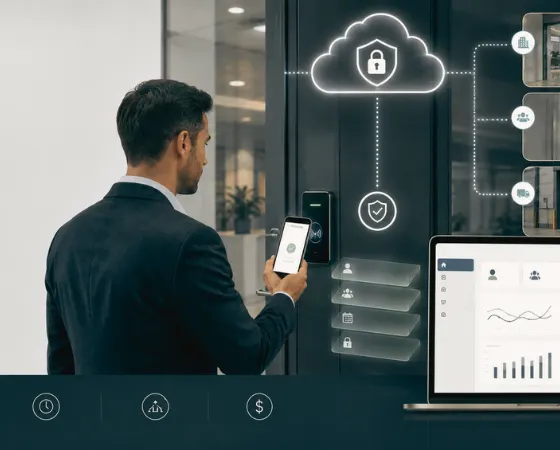
Access Control as a Service (ACaaS) is a cloud-based model for managing physical door access without maintaining an on-premises server.
The management software runs in the cloud, while controllers, readers, and door hardware remain installed on-site. Administrators can manage users, doors, schedules, and permissions through a web or mobile interface from virtually anywhere.
This guide explains how ACaaS works, how it compares with traditional on-premises systems, the credentials and reader technologies it supports, its advantages and limitations, and the key factors to consider when evaluating a cloud-managed access control platform.
Physical Access Control vs. IT Access Control
The term access control is used in both physical security and IT, but it refers to two entirely different systems.
IT access control manages who can log into systems, applications, and networks: user authentication, identity management, single sign-on (SSO), and role-based permissions for digital resources. If that's what you're looking for, this isn't the right article.
Physical access control manages who can enter buildings, offices, rooms, gates, and other physical spaces, relying on door controllers, card readers, credentials, and the hardware installed at each entry point. That's what Access Control as a Service refers to in this guide, and what every section below covers.
The confusion arises because both disciplines use similar terms — credentials, permissions, roles, audit logs. Despite the shared vocabulary, they solve different problems. Physical access control secures buildings and entry points; IT access control manages access to applications, systems, and networks. This article focuses exclusively on physical access control.
How Access Control as a Service (ACaaS) Works
Moving access control to the cloud doesn't mean replacing the hardware installed at every door. Instead, ACaaS separates administration from door operation. The cloud handles management tasks such as users, permissions, schedules, and activity logs, while the hardware at each door continues to make real-time access decisions.
Administration Runs in the Cloud
The cloud platform acts as the central management layer. Administrators use it to:
- Add, modify, or remove users and credentials
- Create access schedules and permission rules
- Monitor door activity and review event logs
- Generate reports and receive alerts
- Access the system through a web browser or mobile app
- Receive software updates and maintenance managed by the provider
Because everything is managed from one interface, changes can be applied across one or many locations without visiting each site.
Hardware Stays On-Site
The physical infrastructure remains where it's needed: at the door. This includes:
- Access controllers
- Door readers
- Electronic locks and strikes
- Door contacts
- Request-to-exit (REX) devices
Most ACaaS deployments also allow controllers to maintain locally cached credentials and access rules, enabling them to continue making access decisions even if internet connectivity is temporarily unavailable.
How a Door Unlock Works
Every access event follows the same basic sequence. When a user presents a credential (an RFID card, key fob, PIN, mobile credential, or app-based remote unlock), the reader sends that information to the local controller. The controller checks whether the user has permission to access that door at that time. If the request is approved, it unlocks the door and records the event. The controller then syncs the activity with the cloud, where administrators can review logs, generate reports, and monitor access across all locations.
Why This Architecture Matters
This split between cloud management and on-site hardware is what makes Access Control as a Service different from traditional on-premises systems. Administrators can manage users, permissions, and multiple sites from a single platform, while local controllers continue making real-time access decisions at each door. The result is simpler administration, reduced infrastructure to maintain, and reliable day-to-day operation even when internet connectivity is interrupted.
Access Control as a Service vs Traditional On-Premises Access Control
The choice between ACaaS and a traditional on-premises system depends on your organization's infrastructure, IT resources, and long-term operational priorities. The table below compares the two approaches across the areas that typically influence deployment and maintenance decisions.
Credential and Reader Types Supported by Access Control as a Service
In an ACaaS deployment, credentials identify who is requesting access, while readers verify those credentials before sending the request to the controller. The cloud platform manages credential assignments, permissions, and access rules, making it easy to issue, update, or revoke access without reconfiguring every door individually.
The credential types supported depend on the hardware installed, including the access control door readers, which determine how users authenticate at each entry point.
- RFID Keycards and Fobs: RFID cards and key fobs remain the most common credentials used in commercial buildings. Each credential is assigned to a specific user and managed through the cloud platform, allowing administrators to grant, update, or revoke access remotely without replacing or reprogramming readers.
- PIN Codes: Keypad readers allow users to enter a PIN instead of, or alongside, a physical credential. They're commonly used for internal doors, restricted areas, or as an additional layer of authentication where higher security is required.
- App-Based Remote Unlock: Some ACaaS platforms allow authorized users to unlock a door directly from a mobile app. Instead of presenting a credential to the reader, the user sends an unlock request through the app, making it useful for remotely granting access to visitors, contractors, or delivery personnel.
- Mobile Credentials: Mobile credentials let a smartphone act as the credential presented at the reader. Because they're issued digitally, administrators can provision, update, or revoke access instantly without distributing physical cards or fobs.
- Biometrics: Fingerprint, facial recognition, and other biometric readers are used in environments where stronger identity verification is required. When supported by the access control platform, biometric credentials can be managed alongside other credential types, although organizations should also consider local privacy and data protection requirements.
- License Plate Recognition (LPR): For vehicle entry points, LPR cameras can identify authorized vehicles and automatically open gates or barriers. This is commonly used for parking facilities, loading bays, campuses, and secured perimeters, while also providing a searchable record of vehicle movements.
Benefits of Access Control as a Service (ACaaS)
The biggest advantage of Access Control as a Service is reducing the effort required to manage access across one or many locations. Instead of maintaining servers at every site, organizations can manage users, permissions, and doors from a single platform while the provider handles the underlying software and infrastructure.
Real-Time Visibility
The cloud platform records and synchronizes every access event, from successful unlocks to denied access attempts and forced entries. Security teams can monitor activity as it happens, review event logs, generate reports, and respond to incidents without waiting to access a local server.
Remote Multi-Site Management
With Access Control as a Service, administrators can manage multiple buildings from a single dashboard instead of maintaining separate systems at each location. This is particularly valuable for organizations operating across offices, campuses, retail chains, or airport access control deployments, where users and permissions often need to be updated across several sites.
Easier Scalability
Expanding an on-premises system often means adding server capacity and additional IT resources. In contrast, ACaaS allows organizations to add new doors, users, or locations through configuration, making it easier to scale without redesigning the underlying management infrastructure.
Lower Maintenance
Because the provider manages the cloud platform, internal IT teams no longer need to maintain on-premises access control servers, install software updates, or troubleshoot server-related issues. This reduces ongoing operational effort and allows IT teams to focus on other priorities.
Automatic Software Updates
Cloud-managed platforms receive regular software updates and security patches from the provider, helping organizations stay current without scheduling maintenance windows or manually upgrading servers. This also reduces the risk of running outdated software for extended periods.
Challenges and Honest Considerations
Like any technology, Access Control as a Service comes with trade-offs. While it simplifies management and reduces the need for on-premises infrastructure, organizations should also understand how the platform behaves during outages, how well it works with existing hardware, and the long-term operational costs before making a decision.
Local Controllers Keep Working During an Outage
A temporary internet outage shouldn't prevent authorized users from entering the building. In most ACaaS deployments, local controllers store cached credentials and access rules, allowing them to continue making access decisions even when the connection to the cloud is unavailable.
Once connectivity is restored, the controller syncs access events back to the management platform. However, any changes made during the outage, such as revoking a credential or adding a new user, won't reach the controller until it reconnects.
Integrating with Existing Door Hardware
Not every ACaaS platform supports the same hardware. Some require proprietary controllers and readers, while others work with a wider range of industry-standard hardware. If you're upgrading an existing system, confirm whether your current controllers, readers, and door hardware are fully supported or whether they'll need to be replaced.
Understanding the Subscription Model
One of the biggest advantages of Access Control as a Service is avoiding the cost of deploying and maintaining on-premises servers. Instead, organizations typically pay a recurring subscription based on the number of doors, users, or sites.
That predictable operating cost can simplify budgeting, but it's still important to evaluate the total cost over several years. Comparing both the upfront investment and the long-term subscription costs will provide a more accurate picture than looking at either in isolation.
Data, Compliance, and Ownership
Because user records and access events are stored in the cloud, organizations should understand how their data is managed. Before choosing a provider, ask where data is stored, how long event logs are retained, whether data can be exported in a usable format, and what happens to that data if the contract ends. These questions become especially important for organizations operating in regulated industries or with internal compliance requirements.
Access Control Plus Video: Why It Matters
Connecting door events to their corresponding video footage cuts investigation time, because the two are usually managed as separate systems that have to be manually cross-referenced. An access log may show that a door was opened at 11:47 p.m., while the camera system contains the footage of that event. Reviewing what actually happened often means switching between platforms, matching timestamps, and manually locating the relevant video.
A more efficient approach is to connect door events with the associated video so they're available from the same interface. This allows security teams to move from an access event to the corresponding footage without searching across multiple systems, improving both investigations and day-to-day monitoring.
How Coram Approaches It
Coram is a cloud-managed access control system that connects to standard reader infrastructure and unifies door management with video surveillance in one platform.
That starts with hardware. Coram's access control board is compatible with both Wiegand and OSDP readers, so organizations can deploy cloud-managed access control on the readers and door hardware already installed, rather than replacing it to fit a proprietary system. Physical access decisions happen through on-site controllers connected to that hardware, while users, permissions, and events are administered through a central cloud interface.
Users can be assigned one or more access methods, including RFID keycards and app-based remote unlock, with permissions configured for specific doors or locations.
Every access event (unlock attempts, door openings, request-to-exit events, forced entries) links to its associated video recording. Because access control and video run on the same platform, administrators review both from a single interface instead of correlating logs and footage across separate systems.
Beyond access control and video, Coram's platform also covers visitor management system, which includes guest check-in, badging, and host notifications, as organizations look to consolidate more of their physical security stack under one vendor.
On the data and compliance questions raised earlier in this guide, Coram is SOC 2 Type II and HIPAA compliant, which matters for organizations in regulated industries evaluating where access and video data is stored and how it's protected.
The result is one platform instead of a patchwork of disconnected tools: access control, video, and visitor management working from the same data, so security teams get to the answer during an investigation without switching systems.
How to Evaluate an Access Control as a Service Provider
Choosing an ACaaS provider involves more than comparing features and pricing. The right platform should fit your operational needs today while remaining reliable, scalable, and cost-effective over the long term. As you evaluate different vendors, consider the following areas.
1. Offline Operation and Reliability
A cloud-managed platform should continue protecting your facility even if internet connectivity is temporarily lost. Most ACaaS platforms rely on local controllers that cache credentials and access rules, allowing authorized users to continue entering the building until the connection is restored.
Questions to ask:
- Do controllers continue operating when the internet is unavailable?
- How frequently are credentials synchronized with the cloud?
- How long can controllers operate offline?
- What happens to access events recorded during an outage?
2. Hardware Compatibility
If you're replacing an existing access control system, determine whether your current readers, controllers, and door hardware can be reused. Some providers support industry-standard hardware, while others require proprietary devices.
Questions to ask:
- Does the platform support existing controllers and readers?
- Are OSDP-compatible devices fully supported?
- Will any existing hardware need to be replaced?
- Can additional hardware be sourced from multiple manufacturers?
3. Video Integration
Many vendors advertise video integration, but the level of integration varies. Some platforms simply link to a separate video management system, while others allow administrators to view door events and associated footage from the same interface.
Questions to ask:
- Is video available directly alongside access events?
- Can administrators jump to the exact recording for a door event?
- Does the integration require a separate video platform?
- How is the integration maintained after software updates?
4. Credential Flexibility
Different users often require different access methods. Employees, contractors, visitors, and temporary staff may all need different credential types and permission rules.
Questions to ask:
- Which credential types are supported?
- Are mobile credentials available?
- Can temporary credentials expire automatically?
- Are revoked credentials removed from all locations immediately after synchronization?
5. Data Ownership and Compliance
Access logs, audit trails, and credential records are valuable security data. Before choosing an ACaaS provider, understand who owns that information and how it can be accessed.
Questions to ask:
- Who owns the access data?
- Can logs and user records be exported at any time?
- Where is the data stored?
- What happens to the data when the contract ends?
6. Total Cost of Ownership
Subscription pricing can reduce upfront costs, but evaluating only the first year's expense doesn't provide the full picture. Compare the long-term operational costs of ACaaS with those of an on-premises deployment, taking into account subscription fees, hardware lifecycle, software maintenance, and future expansion.
Questions to ask:
- What is the total cost over three to five years?
- Are there price increases built into the contract?
- How are additional doors, users, or locations priced?
- What support and software updates are included in the subscription?
Final Thoughts
Cloud hosting alone doesn't make an Access Control as a Service platform worth choosing. What matters is what happens at 2 am when the internet drops, whether the platform works with the readers already on your doors, and whether video and access data live in one place or two.
ACaaS simplifies day-to-day management by moving administration to the cloud while keeping access decisions at the door. Offline performance, hardware compatibility, credential support, video integration, data ownership, and total cost are what separate a platform that holds up from one that doesn't.
The right choice is the one that fits how your team works today and still holds up as your sites, staff, and security needs change.
If you're evaluating ACaaS platforms and want to see how Coram handles offline access, camera integration, and multi-site management in practice, request a demo built around your specific infrastructure.





.png)

