


Access control maintenance takes more upkeep on systems with on-site controllers and servers than on cloud-managed ones, because firmware, patching, and server work move off your team's plate while door hardware still needs hands on it. In practice: quarterly reader and lock inspections across every door, monthly permission audits against your HR directory, and annual battery replacement, plus ongoing server work if you're on-prem.
Most teams start asking this question at a specific moment. The support contract is up for renewal, the vendor sends an end-of-life notice on your panels, or you're building next fiscal year's budget and someone asks who is going to support this. In K-12, it's usually the spring before a summer install window, with a bond cycle in the background. And if you inherited the system from whoever ran IT before you, there's a decent chance nobody handed over a maintenance schedule with it.
The quote covered hardware, licenses, and installation. It said nothing about the ownership cost that shows up later, measured in your team's hours as much as in dollars.
How much maintenance a system needs varies a lot between vendors, and that variance is architectural. It has nothing to do with build quality. Two systems with identical door counts can carry completely different maintenance loads depending on where the controllers, servers, and software live.
TL;DR
- Maintenance splits into hardware wear and permission drift; most checklists only cover the first.
- Architecture, not vendor quality, decides the burden: cloud moves server and patching work off your plate.
- Realistic cadence: monthly permission audits, quarterly hardware checks, annual battery swap and full audit.
- True cost has three parts: in-house labor hours, contract fees, and downtime. None of the three was priced in the original quote.
- Before signing, ask who owns the firmware and whether the maintenance contract is actually optional.

Access Control System Components That Need Maintenance
Access control maintenance splits into two categories that most access control preventive maintenance guides collapse into one list: things that physically wear out, and things that drift out of correctness. Hardware failure is visible and gets attention.
Permission drift is invisible until it causes an incident, and it rarely makes it onto a maintenance checklist at all.
If you need the component-by-component map before you plan upkeep on it, our breakdown of access control system components covers the hardware layer in more detail.
Door Hardware and Locks
Door access control maintenance starts at the mechanical layer: strikes, magnetic locks, hinges, door closers, and request-to-exit (REX) devices. These parts wear regardless of what software runs behind them.
An electric strike that cycles hundreds of times a day on a high-traffic entrance needs more frequent inspection than one on a rarely used side door. Closers drift out of alignment, hinges loosen, and strikes eventually fail to release cleanly even when everything upstream reports normal.
Readers and Credentials
Readers take the most direct environmental abuse: weather exposure, surface wear from constant badge contact, and firmware that occasionally needs a manual push. Credential churn adds a second layer of work, since every new hire, lost badge, or role change means reissuing a credential and confirming the old one no longer works.
Controllers and Panels
This is where the architectural split starts to matter, and it's the component that decides most of your maintenance burden.
A door controller verifies credentials and decides whether to unlock a door. On an on-prem system, someone has to physically reach that panel for firmware updates, configuration changes, and eventual hardware replacement. That's a drive, a badge-in, a ladder or an IDF closet, and a maintenance window, repeated for every firmware release the vendor ships.
Multi-site organizations multiply this by every controller at every location, and the cost compounds faster than door count alone would suggest. Twelve sites with four doors each is not the same maintenance job as one site with 48 doors, even though the door count is identical. Panels also tend to be the reason a modernization project turns into a procurement project: when a controller generation goes end-of-life, the readers and locks on the doors are usually fine, and the panel is what forces the conversation.
So when you're comparing systems, the useful question is not how many doors you have. It's how many places a person has to stand to keep the system current.
Power Supplies and Backup Batteries
Backup batteries are the most commonly skipped maintenance item, and the one that fails at the worst possible moment: during a power outage, exactly when a system needs to keep functioning. Batteries degrade on a predictable cycle, but that cycle only gets tracked if someone owns it.
Software, Firmware, and Integrations
Patching, version compatibility across hardware generations, and integration breakage after an upstream update (an HR system change, a directory sync update) all fall here. This is the category that on-prem systems handle almost entirely in-house, and cloud-managed systems handle centrally.
The Permission Layer Everyone Forgets
Stale credentials for departed employees, over-provisioned roles that outlived their original purpose, and orphaned access nobody remembers granting: this is the maintenance task with actual security consequences, and it shows up in almost no vendor checklist. Unlike a worn-out strike, a stale credential doesn't announce itself. It just sits there until someone uses it.
A neglected door closer eventually fails loudly, someone notices, and it gets fixed. A neglected permission list fails silently, and the first sign of trouble is often an incident report rather than a maintenance ticket. That asymmetry is why permission audits belong on the same schedule as hardware inspections, even though nothing about them looks broken.
Monthly
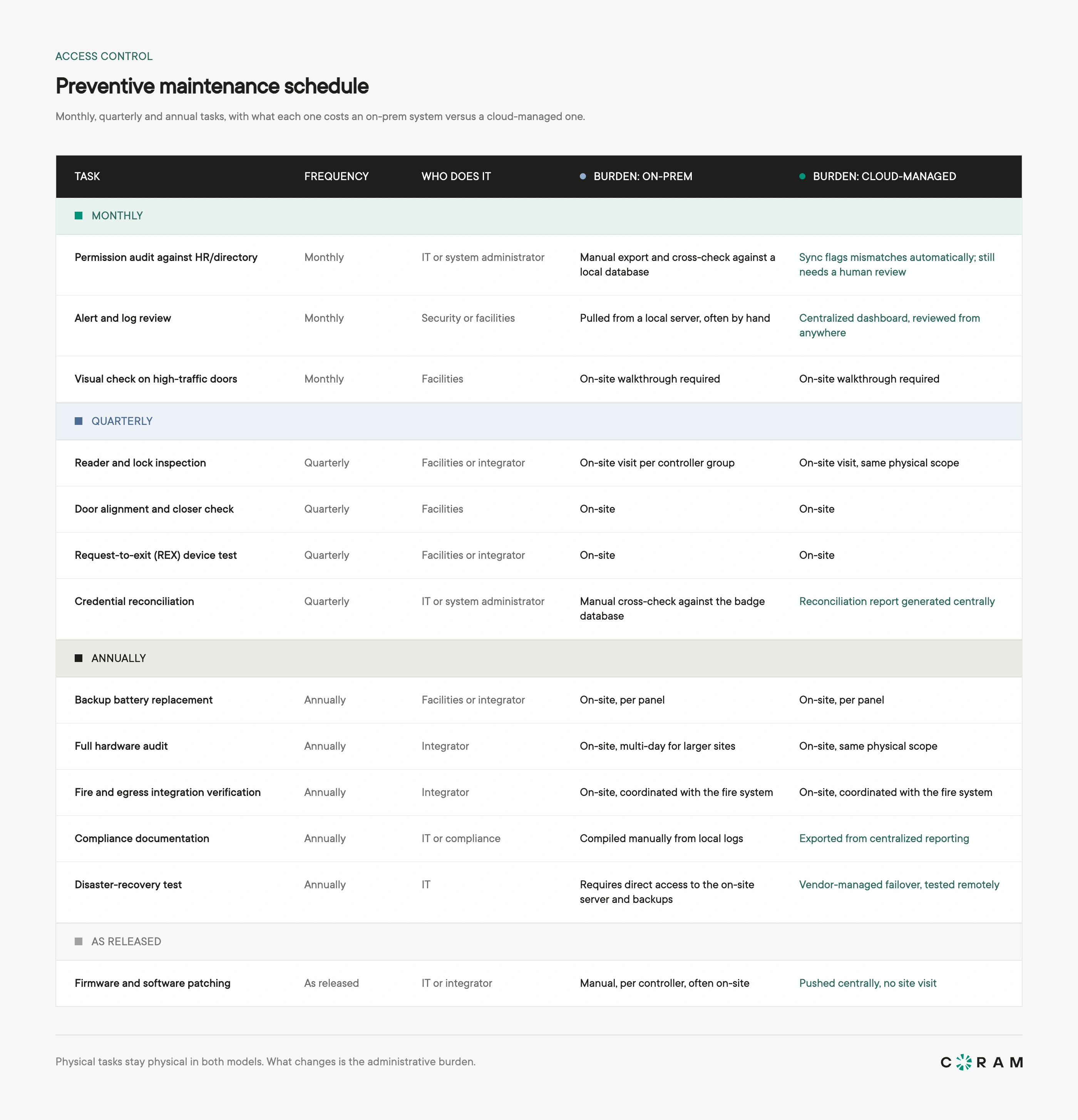
Run a permission audit against HR or directory records, review alerts and access logs for anomalies, and do a quick visual check on your highest-traffic doors. The permission audit is the task most often skipped and the one with the clearest security cost. Treat monthly as the floor: if you have heavy staff turnover or a lot of contractor access, run it weekly.
Quarterly
Inspect readers and locks for wear, check door alignment and closer function, test request-to-exit devices, and reconcile the credential list against active employees and contractors. This is also the point where environmental factors show up: a reader that's been fine all winter can start failing once summer humidity sets in.
Annually
Replace backup batteries on a fixed schedule, ahead of failure. Run a full hardware audit, verify fire and egress integration with a live test, update compliance documentation, and run a disaster-recovery test to confirm the system fails the way it's supposed to.
Event-Driven Maintenance
Some maintenance doesn't wait for a calendar. A power event, a network change, a wave of staff turnover, a failed audit, or any door forced open should each trigger an out-of-cycle check on the systems involved. Waiting for the next quarterly pass means running with a known gap in the meantime.
The Maintenance Split Comes Down to Architecture
Every system on this list carries the same underlying task set. What changes is who does the work, and that split comes down to architecture.
On-Prem Controllers and Older Systems
On-prem systems put server maintenance, OS patching, software upgrades, controller firmware, and often VPN or remote-access plumbing on your team's plate, and much of it still requires a physical trip to the panel. A single-site deployment absorbs this reasonably well.
A multi-site organization multiplies every line item by every location. This is part of why cloud access control is replacing traditional access control systems for organizations managing more than a handful of sites, and the cloud vs. on-premise comparison breaks down where each model actually puts the work.
Cloud-Managed Access Control
The vendor handles firmware and software updates centrally. Diagnostics and system health checks happen remotely. Permission changes propagate without anyone driving to a site. What stays on your team's plate is what a cloud architecture can't outsource: physical door hardware, batteries, and the permission layer itself.
Organizations comparing platforms on this basis are usually weighing the best cloud-based access control systems against one more on-premises refresh.
What Changes When Access and Video Share One Platform
A held-open door, a forced entry, or a reader that stops reading normally means a site visit to confirm what happened. Where access and cameras run on the same platform, that diagnosis becomes a lookup: pull the event, watch the fifteen seconds around it, and see whether it's a hardware fault or someone propping a door with a trash can.
Two qualifiers matter here. This only works where cameras are actually deployed alongside the doors; an access-only system still needs the site visit. And the footage has to be somewhere you can reach it quickly. In Coram's case, video records to a Coram Point appliance on site and is viewed through the cloud, so an investigation doesn't depend on pushing full-resolution footage across a WAN link.
Fewer site visits to confirm a suspicion is a measurable reduction in operational load for a facilities team.
This doesn't mean cloud-managed access control eliminates maintenance. Locks wear, batteries die, and doors fall out of alignment regardless of where the software lives. But the server, patch, and diagnostic overhead move, and for a multi-site IT team, that's often the majority of the recurring burden.
What Access Control Maintenance Costs: Labor, Contracts, and Downtime
Total ownership cost breaks into three buckets: the labor hours your own team spends, whatever a maintenance contract adds on top, and what a failed door costs you in downtime. Most quotes priced the first year of hardware and installation. None of them priced this.
In-House Labor Hours
The most defensible way to estimate labor cost is a formula, not a borrowed number:
Hours per door per year x door count x your team's loaded hourly rate
For the rate, institutional in-house labor runs roughly $55 to $75 per hour. That range comes from Purdue University's published facilities shop rates effective July 1, 2026, and it's a reasonable public anchor if you don't have your own loaded rate to hand.
Build the hours-per-door figure from your own task list, since it moves a lot with door traffic, environment, and whether your controllers are on-prem or cloud-managed. Run it once at your real rate and you have the number that never appeared on the quote.
Maintenance and Support Contracts
An access control maintenance contract typically covers a defined visit cadence, parts and labor for standard repairs, and a response-time commitment for emergencies, with pricing usually structured per door or per site.
What's often carved out: after-hours emergency call-outs, firmware updates tied to specific hardware generations, and any work outside the contracted scope.
Public price points for access control maintenance and support are thin, and most of what circulates online is vendor marketing rather than a neutral benchmark. Get scope and exclusions in writing before you compare numbers, and price the carve-outs separately.
Emergency Call-Outs and Door Downtime
A failed door is rarely just a maintenance line item. It's people locked out of a workspace, or a door propped open because the lock failed in an unlocked state, and both carry a real operational cost beyond the repair bill.
After-hours call-out premiums from integrators add up quickly for any organization running more than a handful of sites, which is part of why remote diagnosis matters as much as the fix itself.
The Five-Year Picture
Ownership cost adds up differently depending on architecture, and it's worth mapping in-house labor, contract fees, and emergency call-outs across a full refresh cycle instead of a single year.
Our breakdown of access control system cost covers the acquisition side (hardware, licensing, and installation) and carries the per-door service and credential-replacement figures you can hold this labor math against.
How to Evaluate Access Control Maintenance Burden Before You Sign
These questions get a vendor to show their maintenance burden before the contract does it for you. Maintenance rarely comes up in the sales conversation, and by the time it does, you've already signed.
Questions to Ask a Vendor Before You Sign
- What updates require a site visit, and what happens remotely?
- Who is responsible for controller firmware, us or you?
- Can we diagnose a failed door remotely, and what exactly do we see?
- Does access keep working if the internet drops, and what stops working?
- What happens to the hardware if we leave?
- Is a maintenance contract optional, or is it effectively mandatory to keep the warranty?
Red Flags in a Maintenance Contract
- Mandatory annual service tied to warranty validity, with no opt-out
- Proprietary parts available only from a single source
- Per-visit charges for what should be a routine firmware push
- Diagnostics that only exist inside the integrator's portal, invisible to your own team
How Coram Access Control Reduces the Burden
Coram is an AI-native unified physical security platform that unifies video, access, visitors, and emergency response in one system, working with 150+ camera brands over ONVIF or RTSP.
Coram Access Control reuses the readers, locks, and cabling you already have and replaces only the panel. We swap the brain on the wall, not your building.
Access Control is one capability of that platform, alongside Video Security, Guest Management, and Emergency Management. A door event, the video of it, and the response workflow live in one system with one audit trail.
Reuses your readers, locks, and cabling. Only the panel gets replaced, so a modernization project doesn't start with re-pulling wire across your door count. Budget for panels; leave the doors alone.
Doors keep working when the network drops. Access control boards stay synced with the cloud but retain permissions locally, so existing schedules keep running and existing permissions stay enforced through an outage. What you can't do while offline: register new credentials, change permissions, create schedules, or trigger a lockdown or override from the dashboard. Where that gap matters at a specific site, add cellular failover.
Directory-synced permissions. Users sync from Active Directory, Entra ID, or your student information system for role-based access. The monthly permission audit becomes a review instead of a manual cross-check against HR.
Hardware is warrantied for the lifetime of an active license. If a controller or reader fails while you're a customer, Coram replaces it. There's no separate warranty contract to keep alive and no service agreement you're required to buy to protect it. Readers, backup batteries, and a 100-pack of ID cards are included per order.
Low-battery alerts before the outage, not during it. The DC-41 controller reports battery depletion as an alert while there's still time to act on it. (The DC-11 doesn't carry a backup battery, so this applies to DC-41 deployments.)
Video-linked access events, where cameras are deployed. Every door event pairs automatically with the footage around it, which turns "was that a hardware fault or a propped door" into a lookup. Footage records to a Coram Point appliance on site and is viewed through the cloud.
One audit trail. Access events, video, and response actions sit in a single searchable log, which covers most of the compliance documentation work in an annual maintenance cycle.
Best for: IT directors maintaining doors across multiple sites with limited on-site staff.
Access Control Maintenance Checklist
This access control system maintenance checklist is organized by component so a facilities or IT team can run it in one pass, without hunting across arbitrary time intervals.
Door hardware and locks
- Inspect strikes, mag locks, hinges, and closers for wear or misalignment
- Test request-to-exit (REX) devices for reliable triggering
- Confirm doors latch fully and close within spec
Readers and credentials
- Check reader surfaces and housings for weather or contact damage
- Push pending reader firmware updates
- Reissue or revoke credentials for role changes and lost badges
Controllers and panels
- Verify controller-to-reader communication across every door
- Confirm firmware is current on every panel
- Document panel location and access for the next technician
Power and backup
- Test backup battery health under simulated outage
- Replace batteries on a fixed schedule, ahead of failure
- Verify main power connections are secure at every panel
Software and integrations
- Confirm software and firmware versions are current and compatible
- Test directory or HR sync for accuracy
- Re-verify any third-party integrations after an upstream update
Permissions and access audit
- Cross-check active credentials against current HR or directory records
- Flag and remove access for departed employees or expired contractors
- Review over-provisioned roles and scale back access that's outlived its purpose
- Confirm visitor and temporary credentials expired on schedule
Download the Access Control Maintenance Checklist. One page, organized by component, with the vendor questions from this article on the back. Take it into your next renewal or vendor conversation. [Get the checklist]

What to Do With This
Pick the three tasks on the checklist that nobody currently owns and assign them by name this week. For most teams that's the permission audit, battery replacement, and the annual egress verification. Then run the labor formula once at your own loaded rate, before your next renewal conversation.
Whatever number comes out is the part of your system's cost that never appeared on a quote, and it's the number that decides whether an architecture change pays for itself.
If that math points at your panels, Coram Access Control keeps your readers, locks, and cabling in place and moves the server and patching burden off your team. Book a demo to see exactly what stays on your plate.





.png)

