


Almost nobody arrives at this question in the abstract.
They arrive because a panel installed in 2009 lost vendor support. Or because the fourth building came with its own system, its own login, and its own user list, and now nobody can answer something as basic as who has access to the loading dock across all four sites. Or because someone asked what it would cost to add a fifth building, and the answer was another server.
Here is the short version.
For most organizations managing multiple locations without dedicated IT staff at every site, cloud-managed access control is the more practical default. The reason is administrative rather than technical: doors, users, schedules, and permissions get managed from a browser across every site without anyone driving anywhere. That advantage compounds with each location you add.
Cloud tends to fit when:
- You manage multiple locations from a centralized team
- No dedicated IT presence sits at every site
- Credentials and permissions change frequently
- An end-of-life panel or server is already forcing the decision
On-premises remains the right answer in narrower cases. Those are below. Hybrid sits between them and gets its own section, because the word describes at least three different architectures and only one of them is a strategy.
One thing to set aside before going further: offline resilience is not the dividing line. In both architectures the door decision is made by a controller in the building, not by software in a data center. More on that below, because it is the most misunderstood part of this choice.
Cloud vs. on-premises access control at a glance
The differences that change the decision. Neither column is a verdict.
Which rows matter depends on how many sites you run, who patches your servers today, and what your compliance obligations say rather than what people assume they say.
Where the two models diverge
Both architectures put the same equipment on the door. A reader at the entry, a controller in a closet or beside the door, a lock, and usually a door position sensor. The reader passes a credential to the controller, and the controller decides.
What differs is where the management software lives and how you reach it.
on-premises runs that software on a server or virtual machine inside your network. You own the box, patch the operating system, maintain the database, and run the backups. Reaching it from outside means a VPN or a remote-access layer someone has to configure and keep secure.
Cloud-managed runs the software on the vendor's infrastructure. The controller holds an outbound connection, caches its credentials, permissions, and schedules locally, and syncs events up. There is no server to maintain and no inbound port to open.
That is the architectural difference, and everything else on this page follows from it.
For a deeper walkthrough of the cloud side, see our guide to access control as a service. For the equipment itself, see access control system components.
Cost and total cost of ownership
The framing you will see everywhere is that cloud is a subscription and on-premises is a one-time purchase. It is wrong in both directions, and it is the most expensive misconception in this decision.
The accurate version is that the two models move cost into different categories. Cloud shifts more of it into recurring software and takes server and administrative overhead off your team. on-premises shifts more of it upfront and keeps maintenance, IT labor, support, and refresh cycles in house.
on-premises is not free after year one. It carries a maintenance or support agreement, server OS licensing, patch management, an integrator service contract at many sites, and a hardware refresh on the usual five-to-seven-year server cycle. First-year software maintenance is commonly benchmarked at 20% or more of net license fees. Cloud is not only a subscription either. You still buy controllers, readers, and locks, and you still pay for installation.
Over five years, the categories look like this.
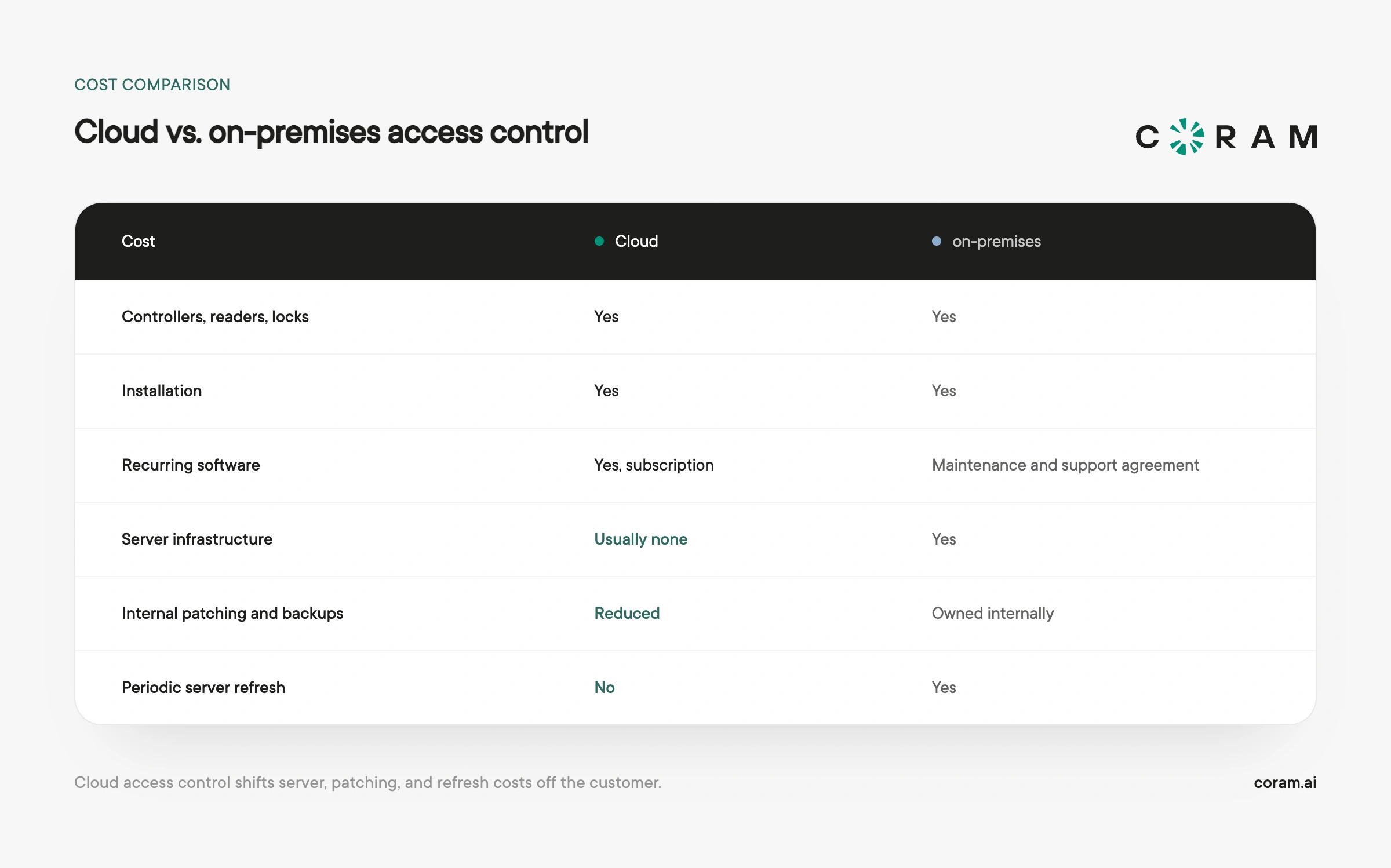
The two rows that usually decide the total are the last two, and neither appears on a quote. Internal IT hours and the server refresh that arrives in year five or six are what separate the models, while the license line everyone compares in the spreadsheet rarely does.
For actual figures, see access control system cost.
Maintenance and IT requirements
Every access control system needs maintenance. The question is whose calendar it lands on.
on-premises means someone patches the operating system, keeps the database healthy, applies updates, tests backups, and administers remote access. At a large organization that is a defined role. At a mid-market company it is usually one person who set it up years ago and became the only one who understands it.
That is the risk, and it is not technical. When that person leaves, the server keeps running. Nobody notices until it stops.
Cloud shifts platform work to the vendor. You still own the network, the switches, the power, and the hardware at the door. If the vendor patches on their own schedule, you gain currency and give up control of timing, which is a genuine tradeoff in change-controlled environments.
Scalability and multi-site management
One building, and this section barely matters. Add a fourth and it becomes most of the decision.
on-premises means another server, or extending your network to reach the existing one, or standing up a federated setup someone has to maintain. Cloud generally lets you add controllers and licenses to a centrally managed environment without standing up another application server. Exactly how sites, users, and policies are organized varies by platform, which is a vendor question rather than an architecture one.
The version buyers describe is more physical than any of that. It is fifteen apps on a phone to reach thirty locations, four different logins to answer one question, and a user list that exists in triplicate because three buildings were bought in three different years. Every site you add makes that worse under on-premises and roughly free under cloud.
For how this plays out at scale, see enterprise access control systems.
Security, privacy, and compliance
Neither architecture is inherently more or less secure. Anyone telling you otherwise is selling one of them.
What determines how exposed you are is patch discipline, whether credentials are encrypted, which reader protocol you run, how much of the system touches the network, and who can reach the administrative interface. That set matters more than the deployment model. An unencrypted Wiegand reader connection is a weakness whether the software sits in a closet or a data center, and OSDP is the right choice for new installations either way.
The cloud-side risk is vendor dependency. You inherit their exposure, and a compromise on their side affects every customer at once. The on-premises risk is the unpatched server nobody is watching, and the inbound port someone opened in 2019 to enable remote access.
On compliance, most frameworks specify controls and audit trails rather than geography. SOC 2, HIPAA, FERPA, and PCI all care about who has access, whether it is documented, and whether you can prove it on demand. Cloud usually makes that evidence easier to produce. Some obligations do name local storage, and air-gapped environments require on-premises outright. Read the actual requirement rather than a summary of it. The gap between what a mandate says and what people believe it says is wide.
One confusion worth clearing: NDAA Section 889 is a component-sourcing question, not a cloud-versus-on-premises question. It governs whose hardware is inside the system and applies identically to both.
Coram's certifications and controls are published at our Trust Hub.
What happens when the internet goes down
Ask ten vendors what your doors do when the fiber gets cut. You will get ten answers, and at least three of them will be wrong.
The short answer: in a well-designed cloud system, the doors keep working. The controller in your building holds credentials, permissions, and schedules locally and makes the unlock decision itself. It does not ask a data center for permission every time someone badges in.
What keeps working: existing schedules, existing permissions, and existing cards, fobs, and PINs. Events log locally and sync when the connection returns, so the audit trail stays complete.
What stops: registering new credentials, changing permissions, editing schedules, and triggering a lockdown or override from the dashboard.
The building keeps working. The administrative surface does not. That is a tradeoff worth planning around, and a much smaller one than "cloud access control stops working without internet." on-premises in the same scenario generally behaves similarly at the door and loses remote administration, which it mostly did not offer anyway.
This varies by vendor, so verify it. Some systems fall back to cached local schedules, some drop to a limited state for a configured period before restricting further, and some stop. Get the answer in writing.
Power is a separate question, and the one people conflate this with. No access control system works without power, in either architecture. Both need battery backup at the controller and a UPS or generator in the closet. Coram's four-door controller supports battery backup, with the DC-BB-12 rated at 12 V and 12 amp-hours at the 20-hour rate; the PoE-powered single-door controller has no internal battery and depends on the network switch staying up.
If a site has frequent or extended outages, the fix is a redundant network path: cellular failover, or a second ISP. That keeps administrative actions from being blocked at the moment you most need them.
When on-premises may make more sense
- Air-gapped or classified facilities. If the network cannot reach the internet by design, the decision is made.
- A written data-residency mandate. Not an assumption about one. The actual language.
- Unreliable connectivity with no failover. If cellular is unavailable and a second ISP is not an option, losing the admin surface for days costs you something concrete.
- A recent panel investment with support life remaining. Replacing a platform you bought two years ago rarely pencils out.
- A specialized local integration. Some building automation and industrial control integrations have never been ported to cloud platforms.
Cost, security, and offline operation are not on that list. They are the three reasons most often given for staying on-premises, and none of them holds up as a general rule.
What about hybrid access control?
"Hybrid" describes at least three different things, and they are not equally good ideas.
1. Local processing with cloud management. Controllers decide and hold data locally while you administer from the cloud. This is what most vendors mean, and it is functionally what most modern cloud-managed access control already is.
2. A cloud layer over existing on-premises panels. A management interface sits on panels you already own, usually Mercury-based. Worth serious consideration when you have significant panel investment. Verify which features are native versus proxied, and what happens if the underlying platform changes.
3. A mixed estate. Some sites cloud, some on-premises, because of acquisitions, phased rollouts, or one location with a genuine constraint. Common and often unavoidable. It is a transitional state rather than a strategy, and calling it one is how organizations end up maintaining two systems permanently. If you land here, set an end date and a target architecture.
The test: if data location is your constraint, hybrid deserves serious consideration. If offline operation is what worries you, re-read the outage section, because hybrid is probably solving a problem you do not have.
Migrating from on-premises to cloud
Most organizations reading this are not building new. They have something, and the question is what happens to it.
Readers, locks, cabling, door position sensors, and request-to-exit devices usually carry over, because many modern cloud controllers support the same legacy reader protocols the old panel used, Wiegand and OSDP among them. What gets replaced is the panel, and the server if you had one. That is where the modern features live, and it is also the cheapest major component to swap.
Credentials are what trip people up. Whether your current cards work depends on their format and whether they are encrypted, and encrypted cards may require the reader's encryption keys, which the original vendor may or may not release. Ask early, because it is the difference between reusing ten thousand badges and reissuing them.
Sequencing matters too. Multi-site migrations usually phase by building rather than cutting over at once, which means running both systems in parallel for a while. Plan for that overlap, and confirm who holds the audit history from the old system after it is decommissioned.
Coram Access Control is hardware-agnostic and designed to work with existing locks and readers, so most retrofits replace the panel and keep the rest. Existing unencrypted cards carry over; encrypted third-party card stock does not.
6 questions that decide cloud vs. on-premises
Plenty of good questions belong in an access control evaluation. These six are the ones whose answers change the architecture. If a question would not move you between cloud and on-premises, it belongs in vendor selection instead.
1. Is internet connectivity structurally restricted? Not "is it sometimes slow." Is the network air-gapped by design, or is failover unavailable at a site? A structural restriction decides this on its own. Intermittent outages do not, because the doors keep working either way.
2. Is there an explicit data-residency requirement? Find the requirement and read it. A requirement naming local storage points to on-premises. One specifying controls and audit trails, which is most of them, points nowhere in particular and should be dropped from this decision.
3. Who owns server maintenance? Name the person who patches the OS, tests the backups, and administers remote access today. If you cannot name them, or the answer is one person with no backup, that argues for cloud regardless of anything else here.
4. How distributed are the sites? A single building can go either way. Centralized administration across several locations, especially with frequent credential and permission changes, is where cloud's administrative advantage becomes much more significant.
5. How long does the existing panel investment have left? Support life remaining, not age. A platform bought recently with years of support ahead is expensive to abandon. One that is out of support is already deciding this for you.
6. What shape can your budget take? This settles more architecture decisions than anyone admits. Bond capital often cannot fund a subscription. Zero-based budgets expire at fiscal-year close whether or not you have chosen. Some jurisdictions cannot sign a multi-year technology commitment at all. In K-12, the binding constraint is frequently a grant window or the summer cutover window, because a district that misses July has lost a year. If your budget structure rules out one shape, that outranks the technical comparison.
If the answers point in different directions, weight them by which constraint you cannot negotiate. Structural connectivity limits and written residency mandates are hard constraints. Almost everything else is a preference with a price attached.
Choosing an access control architecture: final thoughts
Here is the part that rarely makes it into a comparison like this one. The decision has a shorter half-life than it feels like it does.
The server you buy this year comes due in five to seven. The panel platform you standardize on will lose support eventually, the same way the 2009 panel that started this conversation did. Whatever you choose, somebody in your chair revisits it, and the odds are good that somebody is you.
So the question worth answering is bigger than which architecture fits your building today. It is which one you can walk back.
That question has concrete answers, and they are worth asking now rather than in year six. Can you export your credential data in a format something else can read? Does the hardware on your doors keep working if a contract lapses, or does it become a wall ornament? Do your readers and cabling speak a standard, or a dialect only one vendor's panel understands?
Architecture you can reverse is worth more than architecture that scores marginally better on today's spreadsheet, because the spreadsheet assumes a world that holds still, and it will not.
That is also the strongest argument for keeping what you already own. Hardware you keep is hardware nobody can hold hostage, and every reader you carry forward is one less thing your next decision has to pay for.
Architecture is one decision inside a larger one. Our access control systems buyer's guide covers system selection end to end, and if you have settled on cloud, our comparison of cloud-based access control systems covers which platforms fit which buyers.
If reversibility is what you are optimizing for, that is the premise Coram Access Control is built on: cloud-managed from any browser, running on the readers, locks, and cabling already installed on your doors, replacing the panel instead of the building.
FAQ





.png)

