


An access control system decides who gets through which door, when, and leaves a record of it.
The four things that actually separate one system from the next are not on the spec sheet: how you're billed and what happens if you stop paying, whether it runs in the cloud or on your own hardware, whether it talks to your cameras without a second app, and what it truly costs once installation labor is in the number.
This guide turns those into a decision framework, compares the systems buyers shortlist most, and helps you match one to your building.
TL;DR
- An access control system manages entry with credentials, readers, controllers, locks, and software; this guide is for the facilities or security manager choosing one for a commercial or multi-site site.
- The best access control solutions for your organization depend on your situation: deployment model, the hardware you already own, your credential strategy, and whether access and video need to work together. Use the decision framework to map yourself.
- Skip to the comparison table if you already know your requirements and just want a shortlist.
- Hardware is the biggest upfront line (about 60% to 70% of the spend), so reusing the readers, locks, and cabling you already have is the fastest way to lower the total.
The best access control systems: a shortlist
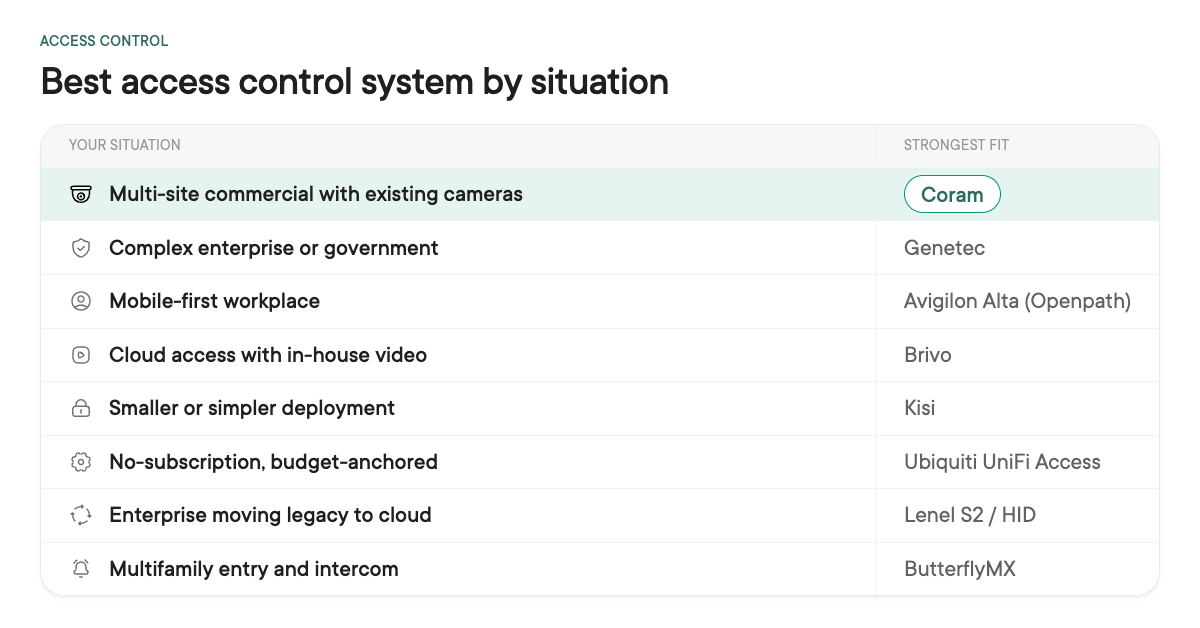
For a multi-site commercial organization, the shortlist comes down to your deployment model, the hardware you already own, your credential strategy, and whether access and video need to work together.
According to our recent State of Physical Security Report, 80.9% of teams would prefer one connected physical security system, but only 22.4% have one today. Coram is strongest for organizations that want unified video and access without replacing their existing cameras.
Brivo now pairs access with its own video after merging with Eagle Eye Networks. Kisi fits smaller, simpler estates, Ubiquiti UniFi Access anchors the no-subscription end, Lenel S2 / HID spans legacy and cloud enterprise, and ButterflyMX is purpose-built for multifamily entry.
Note that this is only a quick read; our access control companies comparison is the full vendor-by-vendor breakdown. For head-to-head breakdowns, we compare Lenel and Genetec, Brivo and Openpath, Openpath and Kisi, Kastle and its alternatives, and Verkada access control in these additional articles.
Note: All of these vendors quote pricing rather than list it publicly, Coram included, so compare on total installed cost, not sticker. Deployment and detection specifics change fast; confirm with each vendor.
Coram
Access control and video run on one platform, so a door event and the camera clip that goes with it live in the same login instead of two separate apps, and the platform flags tailgating, a forced door, or a door held open on its own.
It works with cameras you already own across 150+ brands, and it reuses your existing readers, locks, and cabling; processing runs on-prem while you view from the cloud.
The honest limit: the access control panel itself usually gets swapped during a takeover (the same as with most platforms), and existing cards carry over only when they are unencrypted.
Verkada
A tightly integrated cloud ecosystem that many teams like operating. The pushback buyers raise is total cost over the license term and the proprietary model. If a single-vendor cloud experience is worth a premium to you, it belongs on your list.
Avigilon Alta (Openpath)
Mobile unlock done well, now part of Motorola's portfolio, with Avigilon cameras alongside it. A good fit if a phone-first credential experience is the priority.
Genetec
Widely deployed across large enterprise and government campuses. It scales to very complex, integrator-led environments and unifies access with video and ALPR. It is architected on-premise first, though Security Center SaaS and Cloudlink appliances now bring cloud management, so it fits large campuses more than lean commercial sites.
Brivo
After merging with Eagle Eye Networks, Brivo now offers access and video together in the Brivo Security Suite rather than through integration alone, on an open, cloud-native platform with a deep third-party catalog.
Kisi
Kisi keeps setup and day-to-day administration simple for smaller estates. Ubiquiti UniFi Access wins on the absence of a subscription and is often the price anchor, though it is lighter on identity and user management.
Lenel S2 / HID
Runs deep in high-security and government facilities and now offers a cloud SaaS option (Elements) alongside its legacy on-prem platform.
ButterflyMX
Built for multifamily entry and intercom, not commercial door control at scale.
How to choose an access control system
Feature checklists are easy to line up and rarely decide anything. The buyers who have done this before press on seven questions instead.
1. What happens if you stop paying?
This separates access control from almost every other purchase, because the failure mode is a locked or unlocked door, not a dark screen.
Ask every vendor on your list, including the one you already like: if we stop paying, do the doors still open and can staff still badge in?
Behavior varies by vendor, so get the answer in writing, for the doors, your recorded video, and your credential data. A system that goes dark the moment a contract lapses is worth knowing about before you sign, not after.
2. Cloud, on-premise, or hybrid?
The real question is where your data sits and what you are willing to maintain. On-premise gives you local control and offline resilience but a server to keep running.
Cloud gives you remote management and no server but a dependence on the connection and the subscription. A hybrid that processes on-premise and lets you view and manage from the cloud resolves the concern most IT teams actually raise.
Whatever you choose, put it in the RFP so nobody assumes. The types section below explains what each model means in practice.
3. How does it scale across doors and sites?
A system that is easy at eight doors can get expensive and clumsy at eighty across five buildings.
Ask how licensing scales as doors are added, whether you manage every location from one console, and whether a badge works the same at every site. Multi-site is where the cost and the administrative load compound fastest.
4. What existing hardware can you keep?
This is where retrofit either saves you money or does not. On most platforms your cameras, readers, door hardware, electric locks, and cabling can carry over, while the access-control panel is usually replaced.
Ask each vendor to be specific about what stays and what changes, because a "keep everything" pitch that swaps your panels or requires new card stock is not the same deal.
5. Does video live natively with access?
When a door is forced or held open, the useful next click is the video of that door at that moment. If access and video are separate products with separate logins, that click becomes a hunt across two tools.
Systems that unify the two can flag a tailgate, a forced door, or a held-open door and attach the clip automatically, which on a multi-site estate is the difference between a 30-second answer and an entire afternoon.
6. What happens when connectivity fails?
The internet will drop eventually, and you need to know what the doors do when it does. Ask whether the system keeps enforcing cached schedules locally, whether staff can still badge in, and whether doors fail secure or fail safe by design.
This is the question that most quickly reveals whether a vendor has thought past the demo, and it is easy to skip until the day it matters.
7. What does it cost over five years?
The reader on the quote is a rounding error. What moves the number is installation labor, the licensing model, and whether you are reusing or replacing what is already on the wall.
Budget on a five-year view and ask for the full installed cost, not just the vendor's line item. See the cost section below.
Credential strategy sits underneath several of these.
Decide whether your workforce is card, fob, PIN, mobile, or biometric first, whether you need to reuse cards you already issue, and whether any platform locks you into its own card stock. That choice shapes both the reader hardware and the day-to-day experience.
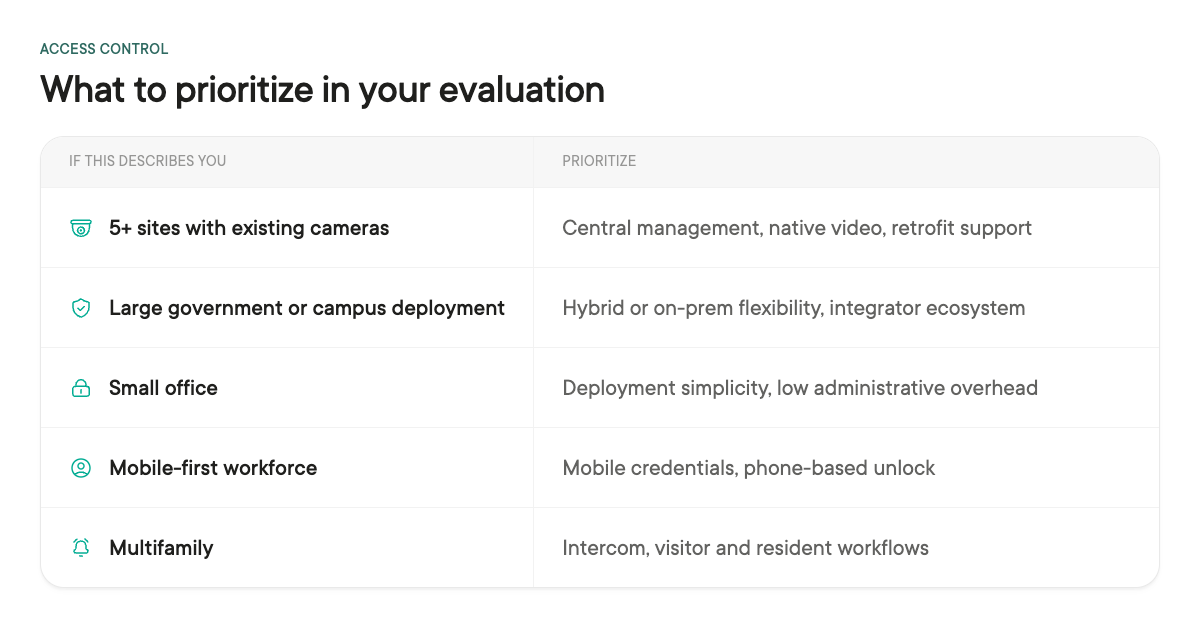
Once you have your answers, this is roughly how they map to priorities:
One more, if compliance touches your world.
If you take federal grant funding, NDAA Section 889 compliance can affect eligibility, because some programs will not fund non-compliant hardware.
Confirm the exact requirement against the specific grant or standard, whether that is NDAA, FIPS, or CJIS, rather than assuming, and get sign-off from whoever owns compliance on your side.
On facial recognition: it is not a reliable primary credential at the door, and several states restrict it in schools, so if a vendor offers face-as-credential, ask how it fails and whether you can turn it off.
How an access control system works: the components
Five parts do the work. You do not need to become an expert in any of them, but knowing what each does makes every quote easier to read. For the full teardown, see our guide to access control system components.
Door readers. The reader sits at the door and captures the credential presented to it, whether that is a card, fob, mobile device, PIN, or biometric. The reader itself usually does not decide whether someone gets in; it passes the credential to the controller. Reader choice mostly follows your credential strategy, so settle that first.
- Compare types in our door readers overview and our key card entry systems guide.
Controllers. The controller, often called the panel, is the decision-maker. It holds your rules and schedules and tells the lock whether to release when a valid credential is presented. It is also the part that keeps enforcing access locally if the network drops, which is why question six above matters. In a system takeover the controller is the piece that almost always gets replaced, so treat it as a real line item rather than a carryover.
Credentials. The credential is what a person carries: a card, a fob, a PIN, a phone, or a biometric. Each trades off cost, convenience, and security differently, and one detail is easy to miss at quoting time: some platforms require their own card stock, so ask whether you can reuse cards you already issue.
- See our breakdown of PIN, card, and mobile credentials, and our guides to mobile access control, RFID access control, and biometric systems.
Electric locks. The lock is the hardware that physically secures the door: maglocks, electric strikes, or smart locks. Locks and their wiring are usually reusable in a retrofit, and how a lock behaves on power loss (fail secure versus fail safe) is a life-safety decision worth making deliberately, not inheriting by accident.
Management software. The software is where you set rules, add and remove people, and read the audit trail. This is where a system either saves your team time or quietly costs it. The features that matter most in practice are role-based permissions, how cleanly it ties to your identity provider so a departure removes door access automatically, and how fast you can pull an entry log when someone asks.
- For a broader view of the hardware and platform layer, see our access control technologies overview.
Types of access control systems
"Types" means three different things depending on who is asking, so here are all three, each answerable on its own.
Type 1: Cloud vs on-premise.
This is about where the software and data live. On-premise gives you local control but a server to keep running. Cloud gives you remote management and no server, but a dependence on the connection for administration and on the subscription. Neither model is inherently more resilient when the connection drops. That depends on whether the controller caches credentials and schedules, which is why it is worth asking every vendor directly. A hybrid that processes on-premise and lets you view and manage from the cloud is worth looking at if data location is your real constraint.
Our guide to cloud versus on-premise access control walks the tradeoffs in depth.
Type 2: Access control models.
This is the permissions logic, the rules that decide who can open what. The models most buyers will encounter are discretionary (DAC), mandatory (MAC), role-based (RBAC), and attribute-based (ABAC); some frameworks add rule-based as a fifth.
Role-based is the workhorse for commercial sites: you set permissions by job, not by person, so a new hire inherits the right doors on day one and a departure removes them cleanly.
Our guide to access control models explains each, and if you are weighing a vendor's own ecosystem against an open one, our proprietary versus non-proprietary breakdown is worth a read.
Type 3: Credential types.
This is what people carry to get in: keycard and fob, PIN, mobile, and biometric. Mobile is rising because the phone is already in the pocket; biometrics suit high-security doors; cards remain the default for cost and simplicity, and many sites run a mix. The one thing to price early is card-stock lock-in, covered in the credentials component above.
One term to keep separate: network access control (NAC). That is an IT security concept for controlling devices on a network, a different category entirely, and nothing to do with doors.
Access control systems by building and industry
The right system shifts by environment, because the doors, the people, and the rules differ. Match yourself to the closest fit.
Commercial buildings and offices. The mainstream case: cloud or hybrid deployment, role-based permissions, and badge or mobile credentials, with clean onboarding and offboarding as people come and go.
Enterprise and multi-site. The whole game is consistency: one policy, one console, and one badge that works the same at every location, plus licensing that stays sane as door counts climb. Central management and identity integration matter more here than any single feature.
Small business. Simplicity and price win. You need clean control over a handful of doors without enterprise tooling or a full-time administrator, so low setup and administrative overhead beats a long feature list.
Apartments and multifamily. Resident turnover and visitor entry drive the choice, so intercom, mobile credentials, and resident-friendly workflows matter more than in a typical office.
Healthcare and hospitals. Hospitals need more granular permissions than an office, because access varies by department, role, shift, and restricted area. Auditability and integration with existing identity systems tend to matter more, and safety and patient areas add rules an office never has to think about.
Industrial and manufacturing. Rugged hardware, shift patterns, and integration with operations shape the buy, and doors often sit alongside cameras watching the same floor.
Data centers. The priority is high-assurance, auditable entry to sensitive space, often with layered credentials and detailed logs for compliance.
Parking and gated entry. Vehicle access adds gates, long-read credentials, and often license-plate or resident workflows that door readers alone do not cover.
Schools. K-12 and campuses carry distinct funding paths, safety requirements, and identity lifecycles that set them apart from commercial buyers.
We’ve written extensively about access control for other verticals many have their own dedicated guides worth reading before you buy:
- banks,
- churches, and
- self-storage.
What an access control system costs
Access control is priced per door and per site, and hardware is the largest upfront line, usually 60 to 70 percent of the spend. Software is a cloud subscription or an on-premise license, and installation labor rises fast in older buildings where cable has to be pulled through finished walls. That is why reusing the readers, locks, and cabling you already have moves the total more than shaving a few dollars off a reader.
Budget on a five-year view, not a purchase price, and ask each vendor to quote the full installed cost rather than just their own line. Our access control cost breakdown page has the details; the ranges below are from it.
*Figures are US market ranges from Coram's cost guide, for planning only, not a quote; biometric readers run higher ($3,000+ per door), and the number for your building depends on door count, wiring condition, and how much existing hardware you keep.
Access control system installation
Installation is where a clean plan on paper meets a building that fights back, and it is often the biggest cost driver on the project. Five things decide how it goes.
Retrofit vs replacement. On most platforms your cameras, door hardware, electric locks, and cabling can stay, while controllers or panels are typically replaced, along with any old proprietary readers that do not speak a modern protocol.
Confirm what carries over before you sign, because "keep your hardware" means different things to different vendors.
Integrator vs self-install. Most commercial and multi-site projects use a professional integrator, because pulling wire, mounting hardware, and terminating locks correctly is skilled work and life-safety-adjacent at the door.
Smaller single-site jobs are sometimes self-installed, but the moment you have maglocks, fire-egress requirements, or more than a few doors, an integrator usually pays for itself in avoided rework.
A typical rollout sequence. Site survey, then a hardware and door plan, then wiring and physical install, then controller configuration and rules, then credential enrollment or migration, then testing, then cutover. On a multi-site estate, prove the whole sequence in one building before you commit the rest.
What drives the timeline. Number of doors, the condition of existing wiring, whether the building is occupied during the work, hardware lead times, and how many sites have to be sequenced. Occupied buildings and long lead times are the two that most often slip a schedule.
A wiring note: OSDP vs Wiegand. New installs increasingly standardize on OSDP, a modern encrypted and two-way reader protocol, over legacy Wiegand, which is one-way and unencrypted. If you are reusing older readers, check which protocol they speak. Our Wiegand access control guide covers the distinction.
For a deeper look at planning and cost, see our access control installation guide.
Writing an access control policy
A written access control policy says who gets which doors, under what conditions, and who approves it. Most organizations write one after an audit asks for it, or after an incident makes the gap obvious. Writing it first is cheaper.
Five things a workable policy covers.
- Who approves access. Name the role, not the person. Requests that route to whoever answers first are how contractors end up with permanent badges.
- Access by group, not by individual. Tie permissions to a role or a department, then tie people to the role. Individual grants are what make a permission list unauditable inside a year.
- Credential lifecycle. Issue, replace, revoke. Offboarding is the usual failure: someone leaves, IT disables the email account that afternoon, and the badge still opens the back door in March.
- Visitors and contractors. Time-bounded access with an expiry date, not an open grant you intend to clean up later.
- Review cadence. Quarterly or twice a year, with a named reviewer. A policy nobody reviews is a document, not a control.
The policy and the system depend on each other. The system enforces the rules and produces the audit trail; the policy is what makes that trail mean something when an auditor or an investigator asks who had access on a specific date. If you answer to SOC 2, HIPAA, FERPA, or CJIS, expect to be asked for both.
Your access control model determines how cleanly the policy translates into permissions, so it is worth settling both at the same time.
Common mistakes when buying access control
- Buying on sticker price. The reader is cheap; the five-year installed cost is the real number.
- Not asking the ownership question. If you skip "what happens if we stop paying," you find out at the worst time.
- Treating the panel as reusable. Cameras, readers, locks, and cabling usually carry over; the access-control panel usually does not.
- Ignoring the camera tie-in. Separate access and video means every door alarm turns into a two-app investigation.
- Assuming your existing credentials work. Some systems require their own card stock, and some reuse only unencrypted cards; confirm before you commit.
- Over- or under-provisioning doors. Wiring and licensing doors that do not truly need electronic control wastes budget, while forgetting to plan for future doors or sites means paying to revisit the design later. Map the doors you need now and the ones you will need in three years before you quote.
- Treating access control as proof of who entered. Access control confirms a valid credential opened a door; it does not, on its own, prove that only one authorized person walked through. That is what tailgating detection and paired video are for, and it is a large part of why access and cameras belong together.
- Skipping offline behavior. Ask what the doors do when the internet drops, because it will, eventually.
Vetting Access Control Systems: Where to start
Come back to the four questions that opened this guide: how you're billed and what happens if you stop paying, cloud or on-premise, whether access and video live together, and the five-year installed cost.
Answer those for your own building and the shortlist gets short fast. A renewal date, an end-of-support notice, or a new building is the natural moment to run them. If unifying door control with the cameras you already own is where you want to land, see how Coram access control works or run a free trial beside your current system, and put the same ownership question to us that you would put to anyone else.





.png)

