


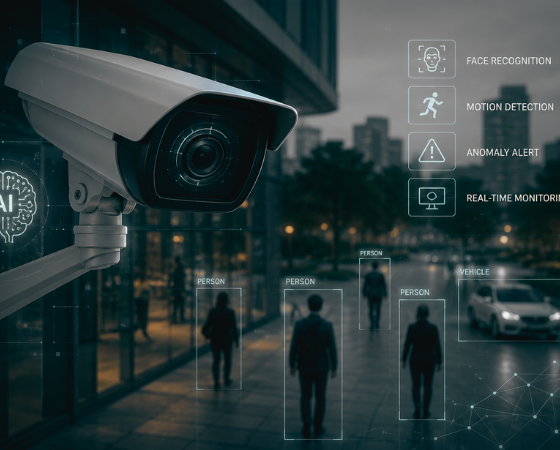
Most commercial camera systems record everything and prevent almost nothing. Footage piles up on a recorder, nobody watches 40 live feeds, and the first time anyone opens the video is after the loss, the injury, or the break-in. An AI security camera closes that gap: the system watches its own feeds, recognizes people, vehicles, and weapons, and tells someone while there's still time to respond.
But if you're evaluating AI security cameras for a building, or a portfolio of them, one decision outweighs every camera spec sheet: where the AI runs. It can live inside the camera, in the platform behind it, or both. That single choice sets your cost, your upgrade path, and whether the cameras you already own can come along. Most vendors won't lead with it, because their answer locks you into their hardware. This guide breaks down what AI cameras reliably catch today, the three architectures you'll actually choose between, and the criteria that separate vendors once you get past the identical detection lists.
What AI security cameras can detect
Vendor detection lists all read the same, so it helps to sort capabilities by the operational problem each one solves. Here's what commercial AI security cameras reliably detect today.
One structural note before the list: in platform-based systems, these detections are software features, not camera features. That's why the list below keeps growing on the same hardware — and why "which detections do I get on my existing cameras" is a fair question to put to every vendor.
People and vehicles
Person and vehicle detection are the baseline — the filters that turn a motion-triggered flood of leaves and headlights into events worth looking at. Zones and schedules make them operational: a person in the parking lot means nothing at noon and a lot at midnight.
License plates are the higher-value vehicle layer. License plate recognition (LPR) automatically detects and records vehicle license plates in real time. Plates become searchable data, not just pixels: with license plate recognition enabled, you can identify and search detected plates in AI Analytics and set up alerts for specific license plates of interest — a banned vehicle returning to a lot triggers an alert instead of a shrug.
LPR is also where camera placement stops being optional. Coram's guidance: position LPR cameras within 30 degrees of the plate angle and two to six meters off the ground. No model rescues a camera that can't see the plate.
Weapons
Firearm detection is the capability that changes response math. A visible gun in a hallway camera becomes an alert in seconds — not a discovery made during the post-incident review. Coram lists firearm detection among its standard alert types, alongside trespassing and loitering, and pairs it with dedicated AI gun detection for schools and workplaces.
Treat vendor claims here with appropriate skepticism. Ask what the detection was trained on and what the false-positive rate looks like on your camera angles. Then ask the operational question: who gets the alert at 7:40 AM on a school day, and what are they supposed to do with it?
Faces and persons of interest
Facial recognition answers a narrower question than most buyers assume. Not "who is everyone?" — "is this specific person here again?" Coram's alert engine includes persons-of-interest detection in its standard set, so a terminated employee or a repeat shoplifter at the door becomes a push notification, not a surprise. Check your state and local rules before enabling it; biometric law varies widely.
Unusual activity and anomalies
The detections that earn their keep daily are usually the unglamorous ones. Coram's alert set covers smart detection for firearms, persons of interest, license plates, slip-and-falls, and absence anomalies. Slip-and-fall detection documents the injury claim that used to be one person's word against a blurry timestamp. Absence detection flags a guard post or reception desk that's been empty too long — a detection type recording-only systems can't even express.
Custom detections extend the list past what any vendor pre-built. Coram also supports natural-language detection setup, powered by large language models (LLMs) — type "vehicle stopped in no-parking area" and the system builds the detection from the sentence.
AI search: asking your cameras questions
Detection covers what you knew to watch for. Search covers everything else. In legacy systems, users had to scrub through video timelines manually to locate incidents — and scrubbing is where investigations go to die.
AI search flips it. Describe what you're looking for in plain language — "person wearing a red jacket and bucket hat on Tuesday" — and matching results come back from every camera in the organization. Coram's Journey Path feature then strings the same person or vehicle across multiple cameras into one chronological view. That view can be saved, downloaded, or shared externally as evidence.
For a security director, this is the feature that changes staffing math. Investigations that took an afternoon take minutes, and they no longer require the one person who knows the VMS.
How to evaluate an AI camera solution
Spec sheets won't separate vendors — nearly everyone claims the same detection list. These four criteria will.
Detection accuracy and false-alarm control
Accuracy on a demo reel is meaningless; accuracy on your worst camera at night is the product. Ask every vendor to run a pilot on your hardest scenes, and measure false positives per camera per day — false alarms are what get AI alerts muted within a month.
Image quality feeds directly into this. A model can't classify a face it can't resolve or a plate it can't read. Low-light performance and resolution at your actual mounting positions matter more than megapixel counts on a spec sheet — test the night feeds, not the brochure.
Then check how much control you get. You should be able to draw detection zones on the camera frame and set schedules for when each alert applies. Each alert should route to specific people — by push notification, email, or SMS. A system that can only alert everyone about everything is a noise machine.
Whether it works with the cameras you already own
This is the biggest cost question, and vendors bury it. If the AI only ships inside proprietary cameras, your real price is the per-camera hardware cost times every camera you own — plus the same again at the next hardware generation. If the AI runs in the platform, your existing IP cameras become the sensors and the project cost drops to an appliance and a subscription.
Ask directly: "Does this work with the ONVIF-compliant IP cameras on my walls today?" Then ask which detections, if any, are restricted to the vendor's own hardware.
Alerting, search, and day-two operations
Buy for week 40, not day one. In the demo, type a plain-language search yourself and time it. Check what an alert looks like on a phone at 2 AM. Ask who patches the system, who maintains the servers, and whether remote access requires a VPN — the answers predict how much of your team's week this system will consume.
One more demo test: hand the interface to the person who will actually use it daily. If your front-desk lead or facilities manager can't find a clip in two minutes without training, the analytics won't matter.
Cost model and licensing
Edge-heavy systems are capital purchases: cameras, licenses, and a refresh cycle. Cloud-native systems are subscriptions that bundle software updates and new detection types. Neither is automatically cheaper — get hardware, installation, and annual cost as three separate numbers on every bid, and compare at year three, not day one.
Read the license terms for the analytics specifically. Some vendors sell detections as per-camera add-ons, so the AI features you saw in the demo can double the quoted price once applied to every camera. A single subscription that includes the detection set is easier to budget and harder to get surprised by.
Privacy, retention, and compliance
AI detections are records about people, which puts them inside privacy and records rules that plain video never triggered. Facial recognition is the sharpest case — several states regulate biometric data directly, and schools and public agencies often carry their own retention requirements.
Three questions cover most of it. Where is footage and detection data stored, and for how long? Who can access it, and is that access logged? Can you switch individual detection types off — per camera — where law or policy requires it? A vendor without crisp answers is handing the compliance work to you.
Edge-only vs cloud-native vs hybrid: side by side
The table below compares the three architectures on the criteria above. Match it against your constraint — existing cameras, IT bandwidth, site count — before shortlisting vendors.
If your cameras are old and failing anyway, edge-only is worth pricing. If your cameras are fine and your problem is intelligence, cloud-native wins the math — you're buying software instead of re-buying glass.
Hybrid earns its place at multi-site scale. When one team covers a dozen buildings, local inference plus one cloud view is the only setup that doesn't multiply either bandwidth bills or head count.
Want to see the comparison run on your own buildings? Book a demo.
Where Coram fits
Most AI security camera vendors sell the intelligence and the glass together — the AI is the reason to buy their camera. Coram takes the opposite position: the AI lives in the platform, and it runs on the cameras you already own. The architecture is blunt about it: an on-prem plus cloud Coram Point NVR layers AI analytics onto any IP camera, bringing object recognition and analytics to existing IP hardware — no rip-and-replace.
That makes Coram the cloud-native column of the table above. Detection — person, vehicle, firearm, license plate, slip-and-fall, absence — plus natural-language search run as software on the appliance and the cloud, not as features of a particular camera. Footage is reachable "remotely from a web browser or mobile device without any VPN or firewall setup," and the appliance is fully managed with automatic software updates (coram.ai/nvr).
The video side also isn't the whole platform. Coram is an all-in-one security and safety management platform that combines intelligent video analytics, alert automation, access control, and emergency response tools in a single interface. The same system that flags a gun can manage access control events like forced doors, tied to the video timeline. On the response side, the platform's emergency management tools trigger standard protocols — evacuate, lockdown, secure, shelter, hold — and can lock or unlock doors remotely during an incident.
If your evaluation shortlist needs a cloud-native entry that doesn't start with "first, replace your cameras," that's the slot Coram fills.
AI security cameras by industry
The detection mix that matters shifts by building type. A quick map:
Warehouses and manufacturing
Forklift-pedestrian near misses, blocked exits, and slip-and-falls are daily events, not edge cases. Fall detection turns injury claims into documented video evidence, and LPR at the gate logs every vehicle without a guard writing plates on a clipboard. Custom detections cover the site-specific rules — trailers parked in fire lanes, people in areas that require PPE — that generic motion alerts never could.
Schools and campuses
Firearm detection and persons-of-interest alerts do the watching no staff member can sustain across hundreds of cameras. The escalation path matters as much as the detection — an alert that reaches administrators and resource officers in seconds is the point. Systems that tie detection to emergency workflows, not just notifications, shorten the distance between "seen" and "acted on."
Offices and commercial buildings
After-hours trespass, tailgating at badge doors, and propped fire exits are the routine failures. Pairing camera AI with door events puts the video and the access log in one timeline, so "who followed whom through the door" takes one search. For facility teams, absence and loitering detection also cover the lobby and dock hours nobody staffs.
Retail
Loss prevention lives on recognizing repeat offenders and searching fast across stores. Persons-of-interest alerts flag known shoplifters at entry, and cross-site AI search means one investigator can work every location from a desk instead of requesting exports from store managers.
Healthcare
Falls, absence from monitored areas, and restricted-zone access map directly to patient-safety incidents. Detection types like slip-and-fall and absence anomalies were built for exactly these environments. Privacy design matters most here — per-camera control over which detections run is a requirement, not a preference.
See what your existing cameras can detect. Book a demo.





.png)

