


At most warehouses, the only record of who came through the gate today is a clipboard sitting on a folding table near the dock. That's the visitor management system most sites are actually running, and it shows.
A driver pulls up, scribbles a name, and gets waved through. Nobody checks the ID or verifies whether that carrier has been flagged at another site. If the sheet goes missing at the end of the shift, which happens often, there's no backup, just a gap in the record.
That's the default at most sites.
The security issue is obvious once something goes wrong: a theft, an unauthorized individual caught on camera somewhere they shouldn't be, or a compliance audit that requires documentation of every contractor on site for the past 90 days.
The clipboard has none of that. But the throughput problem hits before any incident occurs. Drivers queue while a dock coordinator tracks down a supervisor to approve entry. No notification reaches the right dock when a truck arrives. Manual forms slow the line during peak hours. That friction compounds every single day.
The warehouse needs a system that verifies drivers and contractors at the gate and connects that activity to the cameras, doors, and alerts already running on site. Coram's Guest Management is built to do exactly that, inside one unified security platform, which is what the rest of this piece gets into.
TL;DR
- For a warehouse, the right visitor management system verifies drivers and contractors at the gate and connects that activity to cameras, access control, and emergency response already running on site.
- Coram Guest Management does this natively, putting check-in, blacklist screening, and camera footage on the same timeline and dashboard.
- iLobby (FacilityOS) fits regulated industrial sites needing contractor compliance and global denied-party screening, but runs on proprietary kiosk hardware at enterprise pricing.
- Envoy suits a warehouse's attached corporate office, and SwipedOn is the cheapest way to retire paper at a small site, neither of which connects to cameras or access control.
- The paper clipboard, still the default at most warehouses, leaves entry unverified and disconnected from the cameras already installed on site.
What Warehouses Actually Need from a Visitor Management System
A warehouse VMS has to work at an outdoor gate, a dock door, or a guard shack with inconsistent Wi-Fi, not a staffed lobby desk. Most of the people coming through aren't employees. They're drivers, carriers, contractors, and vendors your team has likely never met before and may never see again after this delivery. A backed-up gate also costs money. That's the throughput pressure an office lobby never has to account for.
Speed Matters More Than Polish
A frictionless lobby experience is a nice-to-have. A check-in that takes under 30 seconds at the gate is an operational requirement. The difference between a 30-second check-in and a 3-minute one across 40 arrivals a day is not trivial.
A Name Field Tells You Nothing
Anyone can type any name. The systems worth deploying at a warehouse gate validate that the person standing there matches the ID they present, and screen that ID against a watchlist before they walk through.
Offline Mode Is Non-Negotiable
Large metal structures, outer gates, and yard perimeters regularly kill Wi-Fi signals. A check-in system that stops working when connectivity drops can't be trusted at a warehouse gate.
The Record Needs to Connect to What's Already There
Most warehouses already have cameras and some form of access control at the dock doors. A visitor log that lives in a separate tool, never speaking to those systems, creates exactly the kind of gap that makes incident response painful: the cameras caught the moment, the gate log has an entry, but they sit in two different systems, and nobody can correlate them without manual effort.
Scale matters too. A single-site operation replacing paper has different requirements than a logistics operator managing five distribution centers across three states. Multi-site teams need one dashboard, consistent blacklist policies across every gate, and no per-location logins.
Visitor Management Systems for Warehouses: How They Compare
The Best Visitor Management Systems for Warehouses
Each platform below is evaluated against the same baseline: how well it verifies identity at an unstaffed gate, connects to the cameras and access control already on site, and holds up across multiple locations.
1. Coram Guest Management
Coram is a unified physical security platform that combines video surveillance, access control, emergency management, and visitor management under one login. Guest Management is the check-in layer, built to feed into the rest of the platform rather than sit apart from it.
That distinction matters more at a warehouse gate than it might sound. A typical visitor management tool produces a log entry and stops there. Coram's log entry lives on the same timeline as the camera footage from that gate, the access event at the dock door, and any emergency response triggered during that visit. When something happens, you're not pulling records from three separate systems and trying to reconstruct a timeline manually. That's the gap every other platform in this comparison leaves open: each one handles check-in well enough on its own, but none of them put the visitor log, the camera feed, and the door event in the same place.
For a warehouse running multiple gates or multiple sites, that unification compounds. One flagged arrival doesn't just generate an alert; it can pull up the camera angle on that gate and the access history at the nearest door, in the same dashboard, without anyone having to know which system to check first.
Key Capabilities
Coram's check-in flow and platform connections cover the operational requirements a warehouse gate actually has:
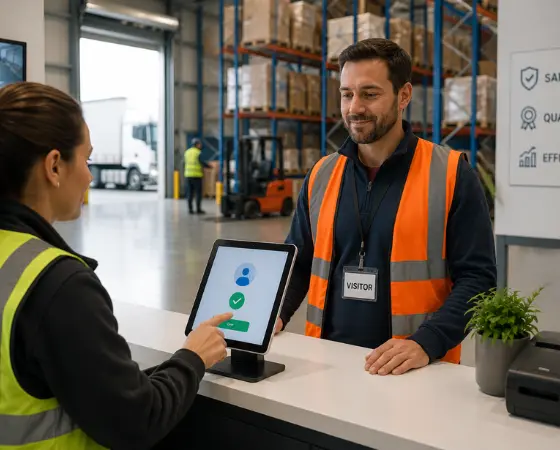
- Gate check-in with optional ID verification: Visitors tap a branded iPad, enter their information, and select their host or dock. The full process takes under 30 seconds. Driver's license scanning, when enabled, validates the name against what the visitor entered, checks the license for authenticity and expiry, and runs a sex offender registry check, all in under two seconds. The license image is not stored; only the verification result and the last four digits of the license number are retained.
- Blacklist screening with approval workflow: Individuals can be flagged by name, email, phone number, or driver's license number. A match holds the visitor at the kiosk and triggers instant notifications to every admin via email, SMS, and browser. Approvals or denials are logged with a reason. If no one acts within three hours, the system auto-denies and records what happened, so there's always an audit trail, even when no one is at the desk.
- Offline operation: Check-ins complete even when the iPad loses connectivity, with all data stored locally and synced automatically once the connection returns. Blacklist checks against external databases are deferred until the device is back online. Badge printing is unavailable during outages but can be triggered remotely from the web dashboard once connectivity is restored.
- Host and dock notifications: When a visitor selects a host at check-in, that person receives a simultaneous notification via email, SMS, and browser. The dock coordinator knows a truck has arrived without anyone having to walk across the floor to find it.
- Multi-site management from one dashboard: Every kiosk, guest log, blacklist entry, and device status across all sites is managed from a single cloud dashboard. Branding, required fields, and welcome messages are all configured from the web and synced to individual iPads instantly. Adding a new gate doesn't require spinning up a new account.
- Connection to the broader Coram platform: Guest Management sits inside the same platform as Coram's video security, access control, and emergency management tools. A flagged arrival at the gate can trigger a coordinated lockdown, camera review, and emergency response, all from the dashboard that flagged it.
Hardware required: iPad running iOS 26.0 or later. Badge printing works with any AirPrint-compatible printer on the same network, including the Brother QL-820NWBc.
Best for: Warehouse and logistics operations managers who need fast, verified gate check-in and want every arrival visible alongside camera and access control activity, at one site or across many.
See how Coram Guest Management works for warehouses →
2. iLobby (FacilityOS)
iLobby is a modular visitor management platform, now operating under the FacilityOS name, built for industrial and regulated environments. Its depth on contractor compliance and watchlist screening reflects years of building for facilities that get audited.
The platform is modular: VisitorOS is the core, and you layer in separate modules for contractor compliance, emergency management, logistics, and access control as needed. For a government contractor managing ITAR obligations, or a pharmaceutical manufacturer where every visitor requires documented safety induction, this architecture gives you more granular control than most VMS platforms.
Where iLobby beats Coram: regulated facilities that need global denied-party screening (ITAR, OFAC) and structured contractor compliance tracking, capabilities Coram doesn't offer natively. Where Coram beats iLobby: any site that wants camera and access control correlation without configuring a separate module, or that would rather use the iPads it already owns instead of proprietary kiosk hardware.
Key Capabilities
iLobby's depth shows up in three areas that matter most for regulated, audited environments:
- Contractor compliance management: Tracks contractor certifications, insurance documents, and training records. Flags contractors with expired documentation before check-in is allowed.
- Watchlist screening against global denied-party databases: Screening goes beyond an internal blacklist. For facilities with ITAR, OFAC, or other regulatory requirements, this is a meaningful distinction from systems that only screen against custom-built lists.
- Modular expansion: Organizations can start with core visitor management and add contractor compliance, access control, logistics, and emergency management modules over time, rather than buying a suite they don't need upfront.
Limitations
The same depth that makes iLobby strong for regulated sites creates real costs elsewhere:
- Priced for enterprise: Plans start at $199/month per location for VisitorOS Corporate and rise to $275/month for the Enhanced tier. For smaller or mid-sized warehouses without regulatory compliance requirements, the pricing is hard to justify.
- Proprietary kiosk hardware: iLobby supplies its own kiosk hardware as part of the plan. This simplifies deployment but ties you to their hardware ecosystem. Standard iPads you already own don't apply.
- Access control is a module, not a native layer: Camera and access control integration is available, but it requires configuring a separate module rather than inheriting a unified timeline. Correlating a visitor check-in with a camera event takes more setup than it does in Coram.
Best for: Regulated or industrial facilities such as government contractors, defense sites, and pharmaceutical manufacturers, where contractor compliance documentation, global denied-party screening, and regulatory audit trails are the primary requirements.
Pricing: Starts at $199/month per location (VisitorOS Corporate); $275/month per location for the Enhanced tier.
3. Envoy
Envoy is a workplace visitor management platform built for staffed office lobbies, with desk booking, room scheduling, delivery management, and Virtual Front Desk layered on top of sign-in. It's the most recognizable name in the category and has held the G2 Leader position for five consecutive years. The sign-in flows are polished, the integrations with Slack and Microsoft Teams work well, and the dashboard is clean. For a staffed corporate lobby, it checks every box.
At a warehouse gate, almost none of that translates. Envoy beats Coram when the use case really is a staffed front desk, badge printing for office visitors, and calendar-integrated host notifications, which is exactly the office environment it was designed for. Coram beats Envoy anywhere outside that lobby: an outdoor gate, a dock door, or any setting with high-volume, unscheduled arrivals that need to tie into cameras and access control rather than Slack.
Key Capabilities
Envoy's strengths are concentrated in the office experience it was built for:
- Polished front-desk check-in: Pre-registration, host notifications, visitor photos, document signing, and customized sign-in flows are all well-executed for a lobby environment with a staffed reception team.
- Workplace ecosystem integrations: Native connections to Slack, Microsoft Teams, Google Calendar, and Outlook work well in office environments where hosts are already living in those tools day-to-day.
- Tiered pricing with a free entry point: Basic is free for simple sign-in (capped at 100 entries/month). Standard runs $109/location/month annually. Premium is $329/location/month annually. Enterprise pricing includes blocklist scanning.
Limitations
Those same office-built strengths leave clear gaps at a gate or dock:
- Designed for staffed lobbies, not outdoor gates: Nothing in Envoy's feature set addresses the specific operational reality of a dock check-in: no gate-optimized flows, no yard-appropriate hardware, no design around high-volume anonymous arrivals.
- Blocklist scanning requires Enterprise pricing: The screening capability most relevant to warehouse security is locked behind a custom-quoted tier. You're paying enterprise rates for a feature that should be baseline in this context.
- No unified view with cameras or access control at the operational level: Access control integration exists on Enterprise plans for select systems (HID, Brivo), but visitor data and camera footage remain on separate platforms. There's no shared timeline.
Best for: The corporate office attached to a warehouse campus. Not the gate, not the dock, not the yard.
Pricing: Free (Basic, up to 100 entries/month); $109/location/month (Standard); $329/location/month (Premium), billed annually; custom Enterprise pricing for blocklist scanning.
4. SwipedOn / Sign In App
SwipedOn is a digital visitor sign-in platform built to replace paper logbooks at a low cost, with badge printing and evacuation management included. It merged with Sign In App in 2024 under the Sign In Solutions portfolio and now serves over 30,000 workplaces globally. In early 2026, Sign In Solutions also acquired The Receptionist, another well-known visitor management tool, consolidating even further.
The product earns its 4.8/5 G2 rating. It's easy to use, and pricing is the most accessible in the category: Standard plans at $55/month per location, with annual tiers starting at $630/site/year. For a small warehouse that's been running on paper and needs a clean digital replacement fast, it works.
SwipedOn beats Coram on one axis only: upfront cost for a single small site with no compliance burden and no need to connect to cameras or access control. Coram beats SwipedOn everywhere security requirements exist, since SwipedOn has no native path to ID verification, watchlist screening, or camera correlation, even on its higher tiers.
Key Capabilities
SwipedOn's appeal is speed and simplicity, not security depth:
- Fast, simple digital sign-in: The check-in flow is clean and requires almost no training. Visitors enter their information, a host is notified, and a badge can be printed automatically. You can be live in a few hours.
- Badge printing and evacuation management: Badge printing works on premium tiers. The platform includes an evacuation mode with a real-time list of everyone currently signed in, useful for headcount during emergencies.
- Lowest entry cost in this comparison: Standard plans start at $55/month per location, making it the easiest budget case for a single site that just wants to move off paper.
Limitations
The low cost comes with real ceilings once a site has actual security requirements:
- No ID scanning or watchlist screening on base plans: The system takes a visitor's word for who they are. Advanced screening features are limited or unavailable without upgrading.
- No native connection to cameras or access control: The visitor log and your security infrastructure remain completely separate. Correlating a check-in with camera footage is a manual exercise.
- Limited scalability for multi-site operations with real security requirements: Some users have reported friction managing closely situated sites on separate accounts. For logistics operators running multiple distribution centers with serious access control needs, the ceiling arrives quickly.
Best for: Small, single-site warehouses that want to retire the paper clipboard with a simple, low-cost digital sign-in and aren't operating under compliance obligations.
Pricing: From $55/month per location (Standard); annual tiers starting at $630/site/year.
5. Paper Clipboard / Gate Log
The paper clipboard is the original visitor management system, and it's still the one running at a large share of warehouses today. A driver pulls up, a guard or dock worker hands over a pen, and a name gets written on a sheet. No software, account, or setup involved.
It persists for obvious reasons: no cost, no vendor relationship, and no training required for staff or visitors. Anyone can run it from day one without involving IT or procurement. The comparison to every platform above is simple: a clipboard does less than the cheapest software option on this list, and it does it for free, right up until an incident or audit asks for a record it can't produce.
Key Capabilities
The clipboard's only real strengths are the absence of cost and the absence of failure modes that come with software:
- Zero cost and zero setup: No subscription, no hardware beyond a pen and paper, and no deployment timeline. Anyone can run it from day one without involving IT or procurement.
- No technical failure modes: It doesn't go offline. It doesn't need Wi-Fi. It doesn't require a support ticket when something breaks.
Limitations
What the clipboard can't do outweighs what it can, the moment any real risk enters the picture:
- No verification of any kind: Anyone can write any name. There's no check against who they say they are, no validation of a license, no comparison against a watchlist. The record is whatever the person chose to write.
- No searchable audit trail: When an incident investigation requires knowing who was on site during a specific window three weeks ago, the paper sheet, if it exists, has to be physically found and read line by line. Compliance audits requiring contractor documentation become entirely manual exercises.
- Completely isolated from everything else: The gate log has no relationship to the cameras already covering the facility, no alerting capability, and no way to surface the right information when something goes wrong. It's a record with no memory and no reach.
The real cost of a clipboard shows up once: during the incident, during the audit, during the insurance conversation after a theft, when you realize there's no real record to produce.
Best for: Sites with no security requirements, extremely low visitor volume, and no regulatory obligations. For most warehouses, this is where the process started. It's rarely where it should stay.
Pricing: Free upfront; costs emerge when an incident requires a record that doesn't exist.
Which Visitor Management System Is Right for Your Warehouse?
The right choice comes down to what problem you're actually solving.
- Retiring paper at one small site on a tight budget: SwipedOn or Sign In App. Under $60/month, fast setup, and a real step up from a clipboard without a complex deployment.
- Regulated facility with contractor compliance requirements: iLobby (FacilityOS). The modular architecture and global watchlist screening are built for this. Expect enterprise pricing and a more involved rollout, but the compliance depth is real.
- Corporate office lobby attached to a warehouse: Envoy. Good product for that specific use case. Keep it there and handle the gate separately.
- Verified gate check-in tied to cameras, doors, and emergency response, at one site or across many: Coram. It's the only option in this list where visitor management, video security, access control, and emergency management run on a single platform, and where a check-in event and the camera footage from that same moment live on the same timeline.
Your Gate Shouldn't Be a Blind Spot
Most of the tools on this list will do what they say they do. SwipedOn will retire the paper logbook. iLobby will satisfy a compliance auditor. Envoy will make a corporate lobby look sharp. They're competent products in the environments they were designed for; the question is whether any of them were designed for yours.
A warehouse gate has no scheduled visitors and no staff standing by to receive them. The cameras are already running, but in most deployments, they're completely disconnected from whatever check-in record exists. When something goes wrong, you're left manually correlating a log in one system with footage in another, hoping the timestamps line up.
Coram is built differently. Check-in, ID verification, blacklist screening, and badge printing happen at the gate on a standard iPad. That event lives on the same timeline as your camera footage and your access control logs. If something escalates, emergency management runs on the same platform.
The gate is where you decide who gets onto your property. It shouldn't be the weakest point in your security stack.
Book a demo to see how Coram secures warehouse gates and docks →





.png)

