


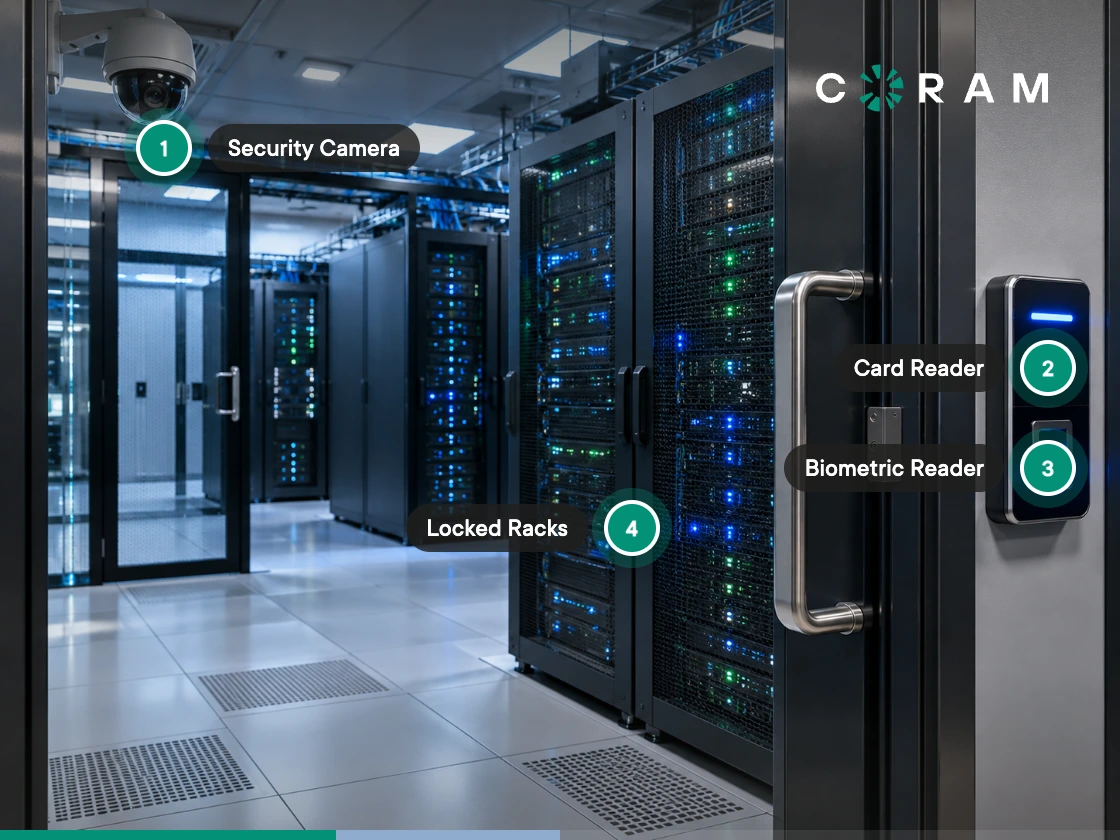
Most server room security problems are not difficult to identify if you look at the complete access path. The question is not only who has a badge, but also who has a key, who can use a master key, which contractors can enter, and when someone's access should have been removed. The room itself raises the same question: the door may be controlled while the ceiling or the walls are not.
Start with the actual list of people and methods for getting inside. Then verify the physical boundary around the room, including the ceiling, floor, walls, door frame, vents, and any other opening. Those two checks establish what your access controls and monitoring actually need to cover before you touch a single setting.
From there, the right model depends on the space. A lean IT team maintaining a single network closet needs a different baseline than one running a dedicated server room across multiple sites. This guide breaks down the five control layers of server room access control and the records you need on hand when an auditor, or your own team during a routine review, asks whether they're working.
Be Honest About What You Are Securing
The room you actually have determines what "secure" means before any control gets added. A network closet, a dedicated server room, and a colocation cage may all hold critical equipment, but they don't get secured the same way. The physical setup determines what you control, where the weak points sit, and which controls are worth the budget.
If It Is a Network Closet
A network closet often comes with a shared wall, a drop ceiling, or a door that doesn't reliably self-close. Start with the physical envelope and the access list here before anything else. Confirm who has keys, whether a master key opens the door, and whether the walls and ceiling actually stop someone from bypassing the door entirely.
If It Is a Dedicated Server Room
A dedicated server room gives you more to work with: four walls, a defined door, and space for one or more racks. Credentialed access and monitoring earn their keep in this setup. You can control who enters, log individual access, monitor the door and rack faces, and retain the evidence those systems generate.
If It Is a Colocation Cage or Suite
A colocation facility changes the math because you don't control the building perimeter. Your responsibility narrows to the cabinet or cage you control, your own access permissions, and the evidence the provider can produce about access to the wider facility. Confirm what's actually covered and what will be available on request before you rely on the provider's controls in an audit.
Then Check the Physical Envelope
Skipping this check is easy, which is exactly why it's worth doing deliberately: does the wall actually reach the structural deck? If it stops at a drop ceiling, the door can be fully controlled while the space above it isn't. Check the same thing below a raised floor and around other openings like vents. Your physical boundary should match the space you intend to secure, not just the space with a lock on it.
The Five Control Layers of Server Room Access Control, and What "Done" Looks Like for Each
Server room access control breaks into five layers, from the physical envelope and access authorization through to monitoring and rack-level security. Here's what each layer looks like when it's properly in place, and the evidence it should leave behind.
Access Authorization Is Where the Real Failure Usually Is
Who can get into the server room right now almost never matches what the badge report alone shows. Don't stop there. Build the list across every access method:
- Badges and credentials: Who has an active server-room credential, and do they still need it?
- Physical keys: Who has a key, including spare or emergency keys?
- Master keys: Does a building or facilities master open the server room? If so, everyone who holds that master is part of your effective access list, whether they're on the official roster or not.
- Vendor access: Can contractors or vendors get in through a lockbox or another side arrangement?
- Mechanical overrides: Who can bypass the normal access-control system if the reader or controller fails?
An access-control system can show exactly which employees hold server-room credentials while the facilities team holds a master key to the same door. If you can't produce a single list of everyone who can open the room, your access list isn't complete, no matter how clean the badge report looks.
Make Offboarding Part of Access Control
A credentialed reader lets you revoke access the moment someone leaves or no longer needs it. That revocation should run through your normal offboarding process, not a separate one someone has to remember. When a role changes or employment ends, the server-room credential comes out at the same time. Physical keys need their own recovery process, including changing the lock when a key doesn't come back.
Review the List on a Set Cadence
An access list that's checked once and never again is not a control, it's a snapshot. Set a review cadence and keep a record of when each review happened. A quarterly pass gives you a clear point to confirm whether badges and credentials are still active, key holders have changed, vendor access is still justified, and no former employee or contractor still appears anywhere in the access chain.
The review itself needs to leave a record. If someone asks when the access list was last checked, you shouldn't have to reconstruct the answer from memory.
Decide How Contractor Access Works Before You Need It
HVAC, electrical, and other vendors sometimes need access outside normal hours. Set the process before an emergency forces the decision: who can authorize after-hours entry, whether the contractor needs an escort, how entry and exit get logged, where that record lives, and who confirms the room was secured afterward. Deciding this in advance gives temporary access an owner, a reason, and a record, instead of an exception nobody documented.
The Door, and Choosing Between Key, Badge, and Both
The choice between a key, a badge, or both comes down to what you need the door to do beyond staying locked.
A keyed lock gives you basic physical control. It keeps unauthorized people out, but it doesn't tell you who opened the door, when they opened it, or whether their access should still be valid, and there's no built-in way to restrict a key to certain hours or revoke it when someone's role changes. A credentialed reader gives you a record of individual access instead: each person carries their own badge or credential, with rules tied to identity and time, producing a complete log of who entered and when. Key cards and fob entry are the common credential formats; biometric readers are worth considering where they apply.
The Access-Control System Can Create Its Own Problem
Check where the controller or server for the access-control system actually lives before installing hardware in the server room. A power or network failure can lock you out of the exact room you need to reach if the controller sits inside it. Keep a mechanical override for that scenario, and know who holds it, where it's stored, and how its use gets recorded.
Check the Door Hardware, Not Just the Reader
Door position sensors tell you whether the door actually closed, but only if the strike and sensor wiring match the hardware and controller setup you're installing or replacing. Confirm how each lock is powered, too: a wet relay powers the lock from the controller, while a dry relay switches a separate supply, and that choice is made per door at installation. A door that can be badged open and then propped open is still a security gap, so confirm the system can tell the difference between an authorized entry and a door being held open. Our guide to access control devices covers the position sensor and request-to-exit hardware in more detail.
Don't Overbuild the Doorway
Piggybacking and tailgating stay possible whenever several people move through one controlled door, but a dedicated controlled vestibule is usually more infrastructure than a typical server room needs. The simpler problem worth solving is the propped door. Make sure it closes properly on its own, and that your door-position monitoring flags it when it's held open.
Monitoring Inside the Server Room
A camera on the door and a camera facing the racks answer two different questions. The door camera establishes who came in. The rack-facing camera shows what they touched once inside. You may not need both in every server room, but it's worth deciding upfront what you actually need the footage to prove.
- Start with the door: a camera covering the entry point tells you who entered and when, and gives you something to compare against your access logs when a specific entry needs review.
- Add rack views when you need more detail: door footage alone doesn't show what an authorized person did once they were inside. A view of the rack faces can show which equipment or cabinet they accessed.
- Set up after-hours alerts: if nobody should be entering the room at night or on weekends, an alert on after-hours entry gives you a signal without requiring anyone to watch a live feed.
Keep Environmental Monitoring Separate
Temperature, humidity, and leak detection often sit in the same server-room budget line as security, but they answer a different question: the condition of the room and equipment, not who's been inside it. A system marketed as "server room monitoring" may be built mainly for environmental conditions. The security side needs access events, cameras, and the records those systems produce, and it's worth confirming a given system actually covers that before you count on it.
Decide How Long You Need the Footage
Retention only matters when you actually need to look back. If an auditor asks about a specific entry from eleven months ago, can you still pull the footage and match it to the access event? If the answer is no, set your retention period based on how long you may realistically need that evidence, then confirm your cameras and storage are configured to support it. Our guide to how long security cameras keep footage covers typical retention periods.
Account for the Network and Power
Cameras inside the server room still need network connectivity and power like anything else on the network. That means accounting for the PoE budget and the switch serving the camera. If that switch also lives inside the server room, include it in the design rather than treating the camera as a standalone add-on that someone else will figure out.
Rack-Level Security
A locked server-room door doesn't stop someone already inside from opening a rack. In a shared or multi-tenant room, the cabinets may need their own locks so that access to the room doesn't automatically mean access to every piece of equipment in it.
- Lock the cabinets where access needs to be separate: if everyone entering the room is authorized to work on every rack, an additional lock may not add anything. If different teams, tenants, or vendors share the room, per-cabinet locks keep that access narrower than the door alone can.
- Check rack units and cabinet sizing before choosing the enclosure: the cabinet has to fit the equipment already installed and leave enough usable space for what you expect to add.
- Keep blanking panels and cable management tidy: beyond airflow, a tidy rack makes changes easier to spot. A new device, cable, or connection should stand out rather than disappear into an already crowded rack.
- Keep serial numbers and the asset register current: the goal is knowing what belongs in each cabinet, not just noticing when something's gone missing. An unauthorized device or addition should be something you can identify against the record, not something you stumble onto.
Getting rack units and cabinet sizing right up front makes every later check faster. You should be able to look at a cabinet and know what belongs there, which equipment is accounted for, and whether anything has been added or moved without authorization.
What Auditors Ask For
An auditor reviewing your server room wants to see how access is controlled and how you know those controls are actually being followed. Here's the checklist to have ready:
- Access authorization list: who is currently allowed into the room, along with the dates that list was last reviewed.
- Access logs: records showing which person entered and when.
- Camera footage: retained footage you can pull when a specific entry or incident needs to be checked.
- Key register: who holds physical keys, including master keys where they apply.
- Contractor records: who was temporarily allowed in, who authorized the access, and whether they were escorted.
SOC 2 can cover physical access controls, PCI DSS applies where cardholder data is in scope, and HIPAA includes physical safeguards for healthcare environments. The specific requirements still depend on your industry and framework, but the records should line up with the controls you actually have in place: if you use badges, have the access logs; if you rely on keys, know who holds them; if you have a server room camera, be able to retrieve the footage when it's needed. That's the information an auditor can actually review.
Where Coram Fits
Most server rooms never get a dedicated camera or door-control budget of their own, which is why it matters that Coram runs access control and video on one platform. Coram Access Control replaces the door controller and works with the readers and locks already on the door, so you get credentialed entry, per-person access logs, and revocation without rewiring the room. Coram Video Security runs on compatible IP cameras you already have, covering the door and the rack faces, and where Coram cameras cover a controlled door, each access event is paired with its clip. For a lean IT team already stretched across networking, devices, and everything else on the list, that means one system to configure and one login to check instead of stitching together separate access and video tools.
Coram does not handle environmental monitoring, such as temperature, humidity, or leak detection, and it doesn't provide rack locks. Those still need to be handled separately if your server room requires them.
Start With the People, Not the Cameras
Whether it's a network closet, a dedicated server room, or a colocation cage, the fastest way to find out how exposed it actually is isn't a new camera or a nicer lock. It's the access list. Pull every path into the room (badges, physical keys, master keys, vendor arrangements, mechanical overrides) and check it against who still needs to be there today. Most of what an audit flags traces back to that list being wrong, not to a control that was never installed.
Once the list is accurate, the physical boundary is the next thing worth an hour of your time: walls to the deck, floor, ceiling, vents. A control on the door means little if the room isn't actually the room you think it is.





.png)

