


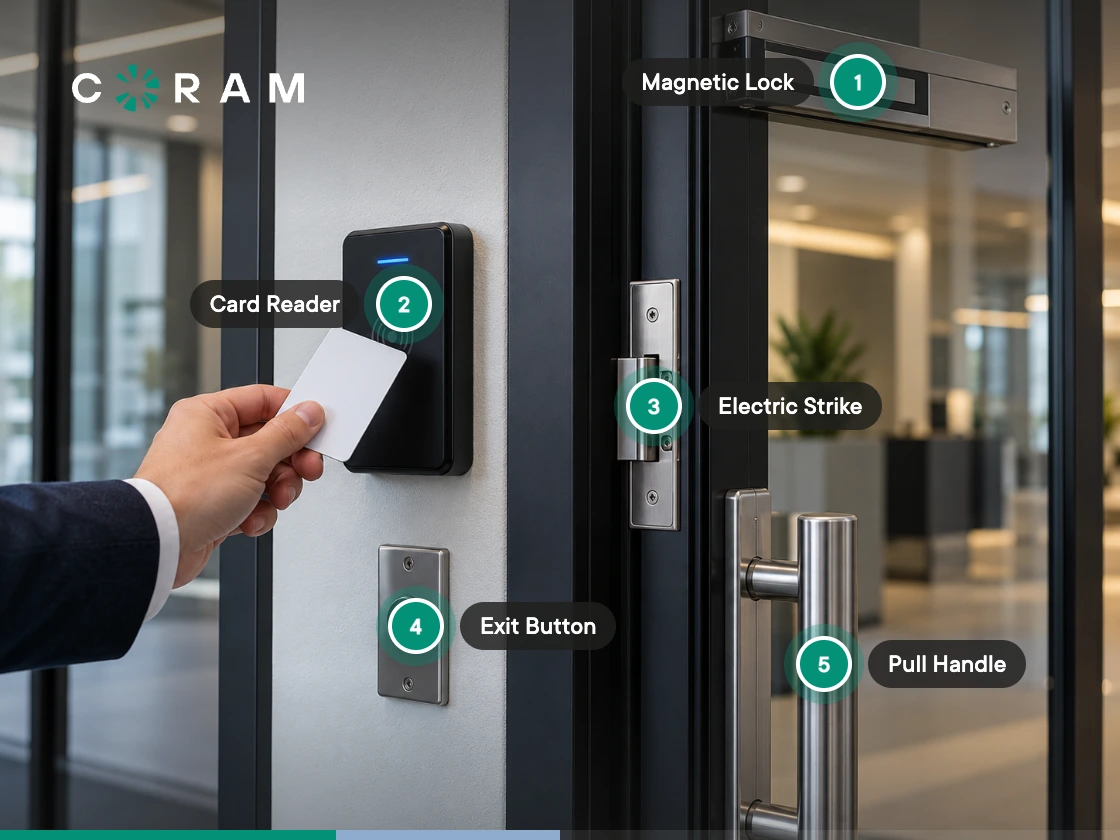
The access control devices on a typical door quote run to a dozen line items, and two of the cheapest ones are usually missing. Nobody notices for about a year. Then a door sits propped open for a whole shift, or a staff member walks out a side exit and the system files it as a break-in.
A door access control system runs on six devices. Four more are optional the day the installer leaves, and two of those four are what let you reconstruct an incident months later.
The short version
- Six devices make a door open: a credential, a reader, a controller, an electronic lock, power, and management software.
- Two sensors decide whether you can prove anything afterward: the door position indicator and the request-to-exit device. Neither arrives in a vendor's box.
- Physical access control devices are not access control models. Those are an information security topic, covered separately.
Every Access Control Device, and What Breaks Without It
Quotes vary, because vendors bundle differently and small hardware hides inside labor lines, so the list below is the whole stack a commercial door needs whether or not each piece shows up as its own row. Read the load-bearing column as a scoping filter rather than a recommendation: a "No" means the door still opens without that device, and something you are probably buying the system for stops working.
Three of those rows go missing from quotes more often than the rest, and they are the three worth hunting for on yours before you look at anything else:
- The door position indicator. A few dollars of sensor, and the only thing that knows the door moved.
- The request-to-exit device. Equally cheap, and the reason your alert log stays readable.
- The lock power supply. Usually buried in the power row, and the one that stalls an installation.
The Dependency Chain: What Each Device Needs From the One Before It
A parts list tells you what to buy. It does not tell you what happens when two of the parts disagree, and that is where these projects go sideways. The expensive failures are rarely a missing device. They are two devices that both arrived and cannot talk to each other.
The credential needs a reader that speaks its format and its frequency
Format and frequency are two different things, and a card can match on one while failing the other. The frequency is the radio band the card operates on; the format is how the credential data is encoded inside that band. Which is why "our cards are 13.56 MHz" is only half an answer, and the missing half is usually the half that bites.
Almost all of this is a retrofit problem, because the cards already in your staff's wallets were chosen by whoever specified the last system, and nobody wrote down what they are.
The reader needs a controller that speaks its protocol, and cable that can reach it
Assuming the reader can read the card, the next link is the one between the reader and the controller. Two protocols carry credential data across it, and the choice sets three things you cannot easily undo later:
- Distance. Wiegand runs to roughly 500 feet. OSDP over RS-485 runs to roughly 4,000. On a large building that is the difference between one closet and four.
- Encryption. Wiegand sends credential data in the clear. OSDP can encrypt it.
- Supervision. OSDP is bidirectional, so the controller can tell a tampered reader from an unplugged one. Wiegand cannot.
For a new build, OSDP is the default. On a retrofit the cable already in the wall usually decides for you, and it will outlive the panel you are replacing. Wiegand access control covers the older protocol and where it still earns its place.
The lock needs a relay signal and a power source, and they are not the same thing
Past the controller the chain reaches the lock, and here it forks. The controller closes a relay to release the lock, but the power the lock actually runs on is a separate decision made per door: depending on how the relay is configured, it either passes through the controller or comes from its own supply beside it.
That fork is where installations stall, because every door needs its lock power source named on the wiring plan, and when the quote does not name one somebody ends up working it out on a ladder.
Cable and lock power share a cause, and it is organizational rather than technical. Access control gets specified in a facilities conversation and paid for from an IT budget, usually a year apart, so the two halves of the decision are made by people who never compared notes. The cheapest moment to settle both is while the walls are still open, and the second cheapest is now, on paper, before anyone signs.
Can You Keep Your Existing Readers and Cards?
All of which lands on the question most retrofits actually turn on, and the one worth answering before anything is ordered: can you keep what is already hanging on the doors?
Usually the answer is yes, and encryption is what decides. Unencrypted cards in a standard format generally carry over to a new controller. Encrypted card stock gets complicated, because reusing it can mean supplying encryption keys from the original reader, and those are rarely available. Access control hardware has changed slowly at the door, which works in your favor: most readers built in the last fifteen years handle the standard 125 kHz and 13.56 MHz formats, and access control technologies at that layer are unusually stable.
Ask about your actual card and reader models, not compatibility in general. Biometric readers are a separate conversation, since a fingerprint or iris reader replaces the credential instead of reading one, and biometric access control systems covers where they fit.
The Two Devices That Decide What You Can Prove
Everything so far is about making a door work. This is about what happens when somebody asks you a question about that door six months later.
A swipe log records the decisions the controller made, which is narrower than what most buyers think they are buying. Picture a door propped open with a wastebasket for twenty minutes. Nobody badged, because nobody needed to, so the controller made no decision and wrote no event. In the software those twenty minutes look like a quiet afternoon. A door position indicator turns them into a held-open event with a start time and a duration, which is not an alert added to a record but a record that would not otherwise exist.
The request-to-exit device does the opposite job and takes noise out. Without one, every ordinary exit through a monitored door reports as forced entry, so a busy door fires alerts all day until somebody switches them off. Now the alert is configured and functionally dead, which is worse than none, because it still reads as covered on a compliance checklist.
The cost of getting this wrong is rarely a break-in. One distributor learned about a slip-and-fall in their warehouse when the legal paperwork arrived months later, and by then there was no footage and no door record from that afternoon to work with. The two sensors that would have produced that record cost a fraction of what the door hardware did, and nobody gives them a second thought until the afternoon they are needed.
Access Control Devices Are Not Access Control Models
Search for access control devices and roughly half the results are about something else, because physical and logical access control share a name and little else.
The permission models you will run into are discretionary, mandatory, role-based, and attribute-based access control, with some frameworks adding rule-based. Those describe how a system decides who may do something, usually with files and databases instead of doors. None of them describes hardware: choosing role-based permissions changes nothing on the door frame. Proprietary and non-proprietary access control covers the architectural half of that decision.
Where Coram Access Control Fits
If you are evaluating rather than diagnosing, here is where Coram sits in this stack.
Coram Access Control replaces the controller and works with the readers, locks, and cabling already on your doors. Each controller runs up to four doors, with no software limit on controllers per site, and credentials use standard Wiegand or OSDP formats at 125 kHz or 13.56 MHz. Coram does not supply locks, position indicators, or request-to-exit devices, so the three lines flagged earlier still belong on your installer's list.
What changes is what happens after an event. Access Control runs alongside Video Security, Emergency Management, and Guest Management on one platform, so where Coram cameras are deployed a held-open or forced-entry alert arrives with the clip already attached. An investigation that meant pulling footage by timestamp becomes a click.
Where to Go Next
Most of a door access control quote covers the six devices that make the door open, and those are the easy part to get right. The two sensors that decide what you can prove afterward are the ones to check for, along with the lock power supply that stalls installations. When you move from components to choosing a system, our access control systems buyer's guide is the next step up.





.png)

