


Taking place annually during the third full week in October, America's Safe Schools Week is a national observance that focuses on violence prevention, K-12 school safety, and the health and well-being of students and staff.
Districts use the week to run drills, audit entry points, review threat assessment protocols, and produce documentation their boards and grant applications can use.
The fact is, Safe Schools Week arrives every October whether your district is ready for it or not. If you carry school safety, you already know it is coming, and you know the difference between a week that moves something and a week that turns into a hallway poster and an all-staff email nobody opens twice.
Districts miss in both directions. Over-planning turns the week into a burden on staff and schedules. Under-planning turns it into a formality that checks the calendar and leaves nothing behind.
This guide covers the six-week September runway, a day-by-day plan with an owner and a required output for each day, who in the district owns which part, and how to turn the week's findings into board documentation and grant evidence.
.webp)
What Districts Get Out of Safe Schools Week
The National School Safety Center established the observance in 1984, sponsored in partnership with state governors and state school superintendents. Participation is voluntary and there is no national agenda. Check your state education agency first, since many states run their own observance on a different schedule with reporting requirements attached.
What makes the week worth the effort is that it forces the assessment nobody schedules. Every safety director knows the walkthrough that keeps getting rescheduled and the drill debrief that never made it onto an agenda.
A dated observance gives that work a deadline, and it gets staff and students practicing before an actual emergency. For the longer version of that argument, see best practices for K-12 emergency management.
What the week leaves behind matters more than what happens during it: assessment findings, photographs, a gap list with owners, drill records, and a district-wide summary. Those records support board updates and can support the needs assessment section of a grant application, otherwise the hardest part to write.
Picture the same district writing that application in February, two ways. Working from memory, someone produces a paragraph about aging entry hardware and general concerns about visitor management.
Working from an October gap list, they produce eleven doors by building and room number, each with a photograph, a responsible party, and a date the district committed to in a public board meeting. Same district, same problems, very different application.
So the output is the point throughout. A walkthrough that produces a written list of doors that fail to latch, with owners and dates, is an improvement plan. One that ends in a hallway conversation is a memory.
Before the Week: Your September Runway
A six-week runway separates planning from execution, so the week itself is spent acting on findings instead of discovering them.
6 Weeks Out: Who Owns This, and at Which Buildings?
Decide whether this is a district-coordinated week with building-level execution or each campus running its own version.
Coordination produces comparable documentation and a straightforward board presentation. Campus independence gives principals flexibility and risks outputs nobody can consolidate. If you are standardizing for the first time, how to improve school safety across a district covers the coordination problem.
Then name one owner per building. Not a committee. One person accountable for the assessment, the activities, and the documentation. Skip this and the week lands on the safety director's desk by default.
The group that gets missed here is law enforcement. SRO calendars fill fast in October, and a partner who joins Thursday's walkthrough brings what internal reviews cannot: an outside read on radio dead zones, building numbering that slows a 911 response, and egress routes that look clear on a floor plan but are not in practice. Six weeks out is the right time to confirm availability. Two weeks out is usually too late.
4 Weeks Out: Do the Assessment Now, Not During the Week
This is the biggest shift in how most districts approach the week. Walking every building, checking entry points, reviewing access control, testing panic buttons, confirming camera coverage: finish all of it before the week begins.
The week is for acting on findings, not discovering that a door does not latch or that a panic button battery has been dead since spring. If panic alert hardware is in scope, how to choose the right school panic button covers what to test.
Walk each building against a structure rather than by general impression. The next section covers the framework most districts use for that, and the same structure everywhere is what makes findings comparable across buildings.
Record what each finding is, where it is, who owns the resolution, and the target date. Pull your last two drill cycles at the same time and flag which protocols have gone longest without practice.
2 Weeks Out: The Three Communications That Matter
The board agenda item. Request a slot on the October board meeting before the week starts. A confirmed presentation changes how documentation gets handled, because the team is building toward a known audience from day one.
The parent notification. Families need advance notice of drills, lockdown drills above all. It does not need to name a time, but it should say what type of drill will run and what students will be told. Districts in states with an Alyssa's Law requirement should confirm their panic alert system is working before the week, not during it.
The staff briefing. Twenty minutes on what is planned each day and what staff document. The difference shows up in the after-action notes.
One logistics item kills well-planned weeks: substitute coverage. Any drill that pulls teachers from instruction needs subs arranged now. Confirm at two weeks, verify at one.
Structuring the Week Around the PASS Guidelines
The Partner Alliance for Safer Schools (PASS) Guidelines are the most widely referenced set of K-12 facility security guidelines in the US, and SchoolSafety.gov lists them among its school safety resources. Running your assessment and your week against them gives your findings a structure a board and a grant reviewer will recognize, rather than a checklist you invented.
Version 7, released in July 2025, organizes school security into five layers: District-wide, Digital infrastructure, Campus perimeter, Building perimeter, and Classroom/interior. Two things changed from Version 6.
Digital infrastructure is new, added because cybersecurity and the management of digital systems now sit inside the school security conversation rather than beside it. And the old Property Perimeter and Parking Lot layers merged into a single Campus perimeter layer, so if your district's last assessment used the six-layer language, your findings need remapping.
Within each layer, PASS sorts its recommendations into four tiers along what it calls a tier continuum. Tier 1 is the baseline PASS says all schools should work toward regardless of location, budget, or risk profile, and Tier 2 is the next step once Tier 1 is in place, phased in as funding allows.
Tiers 3 and 4 are not a scorecard to max out. PASS ties them to what a district's own risk assessment and core security team determine it actually needs, and states plainly that many schools will not be able to implement Tier 4 measures and may not have a need to do so. Tiers are cumulative within a layer, so each one includes everything in the tiers below it.
Two scope notes worth knowing before you plan around it. PASS covers facility security, so it does not address the deployment of security personnel or school resource officers, and it does not cover mental health, behavioral threat assessment, or firearms policy. Wednesday's work below sits outside the framework, which is a reason to schedule it deliberately rather than assume the checklist will prompt you.
The five days that follow map to the layers like this:
The PASS School Safety and Security Checklist gives evaluation criteria for each layer and is worth having in hand during Tuesday's door audit and Thursday's walkthrough. First-time users usually turn up things a general walkthrough misses, particularly around the campus perimeter and parking areas where daily familiarity makes problems easy to stop seeing.
Organizing Friday's board summary by layer and tier also tells your board something a raw gap list does not: where each campus currently sits, and what the next step up would involve.
The Five-Day Safe Schools Week Plan
One theme per day, one written output before the day ends. Ownership is in the next section.
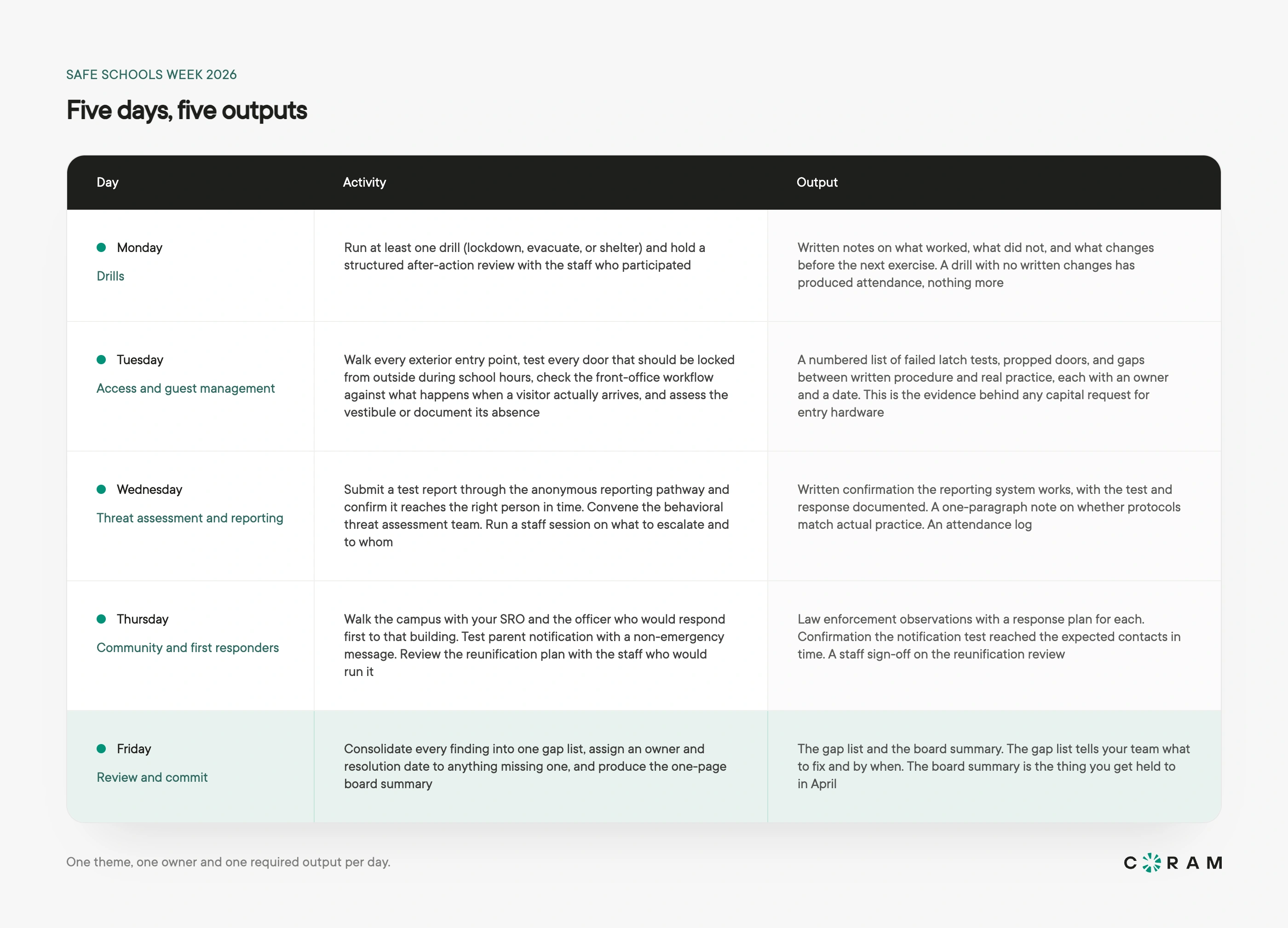
Monday. Confirm which drill types are due under state requirements first. Our guides cover types of school emergency drills, running school safety drills well including the student wellbeing side, the lockdown drill procedure end to end, and how ALICE training sits alongside traditional lockdown response. Check terminology too: the Standard Response Protocol uses Hold, Secure, Lockdown, Evacuate, and Shelter, so "Lockout" is retired and "shelter-in-place" is not an SRP term.
What makes the debrief worth the calendar time is the small things it catches. A classroom door that was already locked from the inside, so the teacher lost time reaching for it. Half a minute gone while two staff worked out which of them was calling 911. A radio that does not reach the far end of the gym. None of that shows up on an attendance sheet, and all of it is measured in seconds during a real activation.
Tuesday. Background on the entry workflow: school visitor management systems, access control systems for schools, access control vestibules, and school lockdown security systems.
Wednesday's work is also easy to deprioritize when time runs short. Anonymous reporting only works when staff trust that something happens afterward. See 10 major school safety issues and solutions.
Thursday. An officer evaluating a building from a response perspective sees different things than a principal managing it day to day, and that gap is usually where the problem is. Have staff sign off on the student reunification review, and if the notification test turns up delivery gaps, school emergency notification systems covers what to check.
Who Owns What During Safe Schools Week
In smaller districts several rows belong to the same person.
After Safe Schools Week: Turning Findings Into Funding
Safe Schools Week produces the thing most grant applications are missing: a dated needs assessment generated through a real process, rather than assembled backward to support a funding request. A gap list built during a structured October week, with findings, responsible parties, and resolution timelines, reads differently to a reviewer than general concerns written up months later.
Grant cycles open months after October, and that is the useful part of the timing. A district that finishes its assessment in the fall has the needs assessment already written when applications open. Windows vary by program and by state, so track the ones you intend to apply for.
Friday's gap list is the source document. Monday's after-action forms document training needs, Tuesday's door audits identify physical security improvements, and Thursday's walkthrough supplies third-party observations. Take dated photographs throughout. A written finding that a vestibule lacks a secondary barrier is useful. The same finding with a dated photograph is evidence.
Our guide to school safety grants covers the funding landscape, and how nonprofits win a security grant walks through the application itself.
Where Technology Fits, and Where It Doesn't
Most of what makes Safe Schools Week valuable has nothing to do with technology. The walkthrough, the drill debrief, the threat assessment review, and the conversation with first responders are procedural, and they depend on people showing up prepared and following through. No platform substitutes for any of it.
Technology changes what happens afterward. Drill documentation assembled from notes gets done inconsistently, reunification records kept in spreadsheets are hard to audit at all, and visitor screening that runs separately from door access produces logs nobody reconciles. Coram's Emergency Management takes that overhead out of work the district is already doing:
- Drill Mode lets you test emergency workflows without sending real alerts. You schedule a drill window of at least 30 minutes for a specific location, and any emergency broadcast for that location during the window runs as a drill: an orange Drill Mode banner appears across the web and mobile apps for everyone with EMS access, and the activity is tagged “(DRILL)”. While a location is in Drill Mode you cannot report a real emergency for it, and if a real emergency is live elsewhere its banner takes precedence. Reporting stays intact either way, so Monday's after-action review has a record to work from.
- Automatic Dispatch contacts first responders for you. When an emergency type with Automatic Dispatch is triggered, Coram shares the details and location with its dispatch partner, who verifies the emergency with your team and then notifies 911 and local first responders. Emergencies triggered by a firearm detection alert skip verification and dispatch immediately. You turn it on per emergency type, and the response view shows dispatch status as it progresses through Acknowledged, First Responders Notified, and Closed. With it switched off, responders can still escalate using the Notify First Responders button. It is available on web and mobile for locations in the 50 states and Washington, DC. Alyssa's Law requirements vary by state, and some versions add mapping obligations Coram does not meet on its own, so confirm your state's statute before you scope anything.
- Reunification handles student accountability and guardian handoff in one process. Teachers mark students safe from their assigned zones on any device, staff verify guardians against SIS records at the pickup zone, and every verification and pickup is timestamped and stored, so the report for an after-action review or a state requirement is one click. Rosters, guardian authorizations, and custody restrictions sync in real time from Clever SIS, and reunification data can also be imported as JSON through the Coram Developer API.
- Guest Management screening runs at the front desk in the same dashboard as Video Security and Access Control. Optional driver's license scanning checks three things in under two seconds: the name against what the guest entered, the license for validity and document authenticity, and the guest against sex offender registries. The license image is not stored, only the verification result and the last four digits. You can flag individuals by name, email, phone number, or license number; a flagged guest is held at the kiosk while admins are notified to approve or deny, and entry is denied automatically if nobody acts within three hours. Check-in runs on an iPad and completes even when the network drops, though screening is deferred until the kiosk is back online. Where Coram video is deployed, a check-in sits alongside footage from that entrance.
- Works with existing infrastructure. Emergency Management is software only. It runs on the mobile devices, iPads, and web browsers a district already has, and layers onto the IP cameras you already own. Lockdown fires through Coram Access Control, whose readers support both OSDP and legacy Wiegand wiring, so doors come on without rewiring. Panic buttons get added where a state requirement or a specific workflow calls for them.
Emergency Management is one capability of Coram's AI native unified physical security platform, alongside Video Security, Access Control, and Guest Management. For a district running a structured week, that means fewer places to look when Friday's board summary is due.
Safe Schools Week Planning Checklist
Before the week
- Decide the scope and assign one named owner per building
- Confirm law enforcement availability for Monday and Thursday
- Complete the physical assessment; document findings, owners, and dates
- Finalize the drill schedule and identify overdue protocols
- Download the PASS Version 7 checklist and structure the assessment around it
- Draft parent communications and hold the staff briefing
- Arrange substitute coverage and schedule the October board presentation
- Test the anonymous reporting system and verify routing
- Test the panic button system: batteries and connectivity
During the week. Use the five-day plan above. Each day has one thing to confirm: that the day's output got written down.
After the week
- Present findings and commitments to the school board
- Transfer the gap list to Facilities and IT for tracking
- Organize findings by PASS layer for grant applications
- File the week's photographs with the assessment records
- Review upcoming grant windows and schedule a follow-up assessment
What to Do Next
The measure of Safe Schools Week is what the district has when the week ends. Documented findings, assigned owners, real dates, and a plan that survives past October.
If you are planning for 2026, work backward from the third full week of October. Start with the checklist above, name your building owners, and get the physical assessment done in September so the week itself can be spent acting on what you find. Feel free to reach out to us if you need physical security consultation on how to make your campus safer as part of your Safe Schools Week plan.
About Coram
Coram delivers an AI native unified physical security platform built for schools and public sector organizations. By unifying video, access, visitors, and emergency response in one system, Coram helps districts prevent threats, detect incidents in real time, investigate events faster, and coordinate response across campuses through a single operational platform.
Built to work with existing infrastructure, Coram helps schools modernize safety operations without costly rip and replace projects. AI powered detections identify threats like firearms, unauthorized entry, and critical safety events in real time, while coordinated emergency workflows help staff, administrators, and first responders activate response in seconds during critical incidents.
Trusted by schools and public sector organizations, Coram helps districts improve operational visibility, simplify emergency coordination, meet evolving safety mandates, and protect students and staff more effectively.





.png)

